
Overview
In the AIZOPlan demand management process, each new request progresses through structured lifecycle stages :
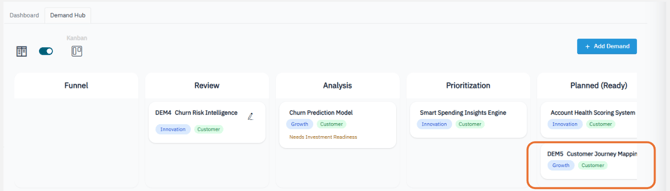
Funnel → Review → Analysis → Prioritization → Planned
The Prioritization stage is where demands are evaluated and ranked based on strategic value, ROI, investment readiness, and available funding. This process determines which demands are best positioned to move forward into execution.
Once a demand is selected for execution, it moves to the Planned stage (also referred to as the Ready stage), signaling official approval for implementation.
This article outlines what happens during this transition and the key actions users must take.
🔢Step1. Accessing the demand in the Demand HUB
- To Open the Demand Management Studio from the main navigation
Portfolio → Plan → Demand Management Studioor directly from the Portfolio Office. - Click the Demand Hub tab to access the central workspace for managing demands.
-
Locate the demand currently in the Prioritization stage
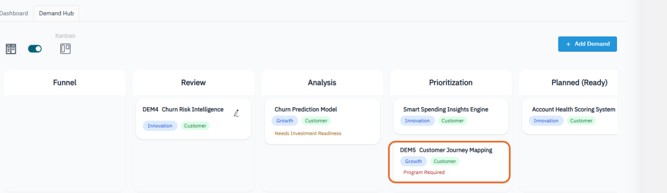
🔢Step2. Evaluate and Rank the demand
At this stage, demands should already be assessed based on:
-
Strategic value
-
ROI simulation
-
Investment readiness
-
Available funding
This evaluation determines which demands are ready to move forward.
🔢Step3. Pre-check before moving to Planned
Before transitioning, confirm that all critical information is in place.
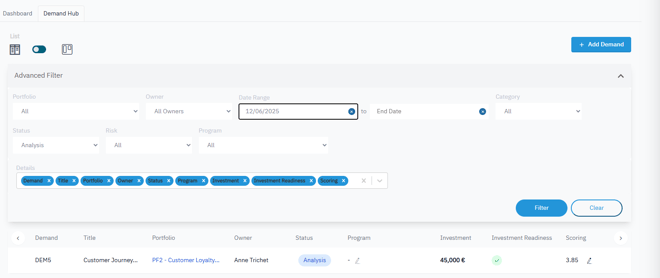
In the Demand List View, verify that the following fields are complete for the demand:
-
Program: A program is linked
-
Risk: Key risks are identified
-
Investment: Total investment is defined
-
Investment Readiness: Assessment is completed
- Scoring: Scoring is set and finalized
🔢Step4.Transition the demand to Planned
1.Switch to the Kanban View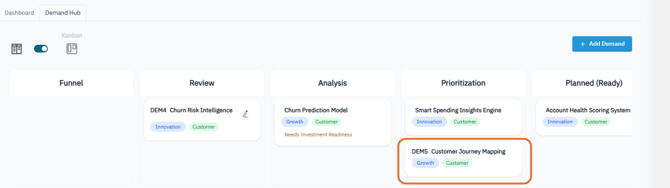
2.Move the demand to the Planned status.
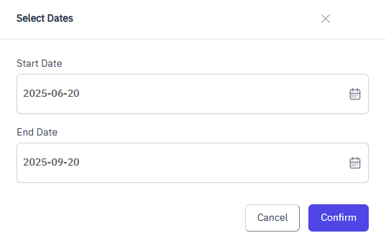
3.A dialog box will prompt you to confirm the Start Date and End Date.
📌 What Happens in the System
Once the demand is moved to Planned:
-
Its status is officially updated
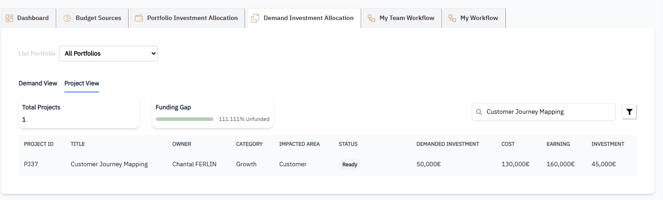
- The Investment Planning module reflects confirmed investment in the Demand Investment Allocation – Project View
-
The demand is converted into a Project and added to the Project Backlog, ready for execution planning and tracking.

✅ Summary
Transitioning a demand from Prioritization to Planned marks the shift from strategy to execution.
By validating readiness and confirming investment, you ensure that delivery begins with full visibility and alignment—setting the project up for success.