
Overview
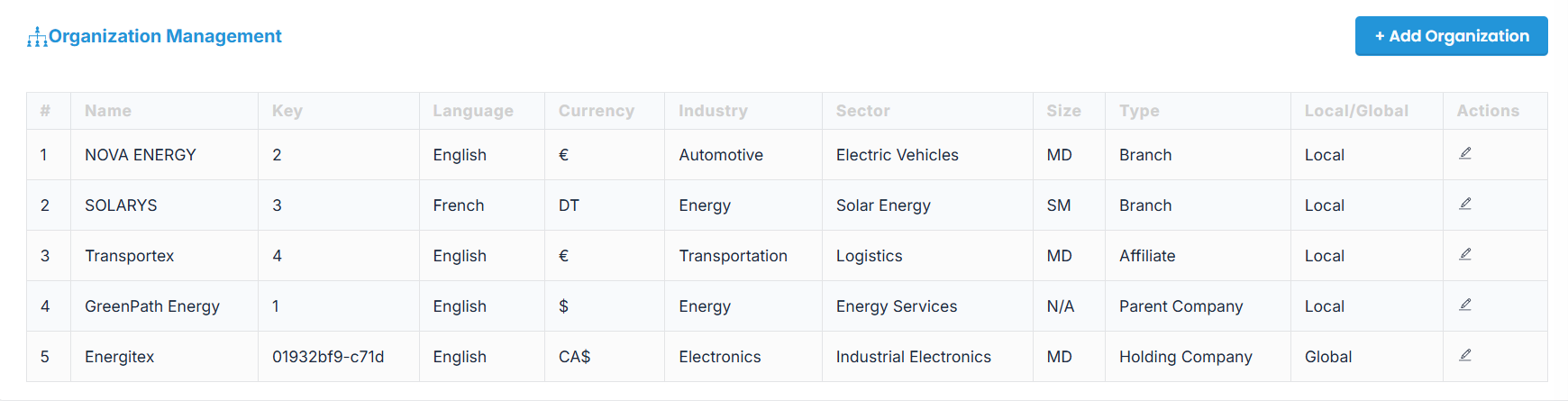
AIZOPlan allows to define and manage multiple organizations within your enterprise account.
In AIZOPlan, an organization refers to a distinct business unit, entity, or structure within your enterprise that operates with its own strategy, teams, and planning rhythm.
An organization can represent:
-
A parent company, subsidiary, Branch, Franchise, Holding Company, Affiliate, Joint Venture, regional office
-
A business unit, or department
Each organization may have:
-
Its own strategic priorities and objectives
- Its own budgeting cycles, teams, and projects
This article explains how to create and manage multiple organizational entities within your enterprise account.
Note: Only users with Administrator permissions can perform this action.
📌Access Organization Management
-
From the upper-right corner of the screen, click on Account
-
Go to General Settings > Organization Management
.png)
➕Create a New Organization
Click the "+ Add Organization" button on the right side of the screen
📝Fill in Organization Details
1. Complete the Add Organization form with the following fields:
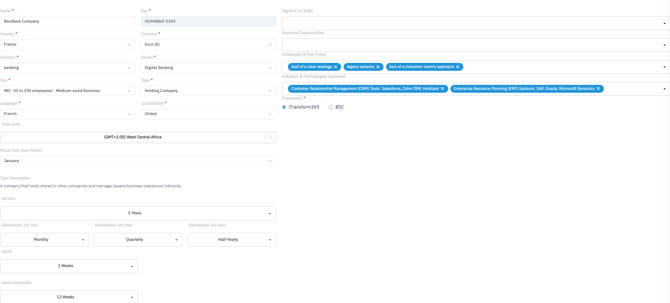
🔹 General Informations :
-
-
Name
-
Country
-
Currency
-
Industry / Sector
-
Organization Size
-
Organization Type (e.g., Parent Company, Subsidiary, Branch, Franchise, Holding Company, Affiliate, Joint Venture, Business Unit, Department, Region/Regional Office, Sister Company)
-
Language
-
Local / Global designation
-
Time Zone
-
Fiscal Year Start Month
-
🔹Planning Rhythm / iteration:
-
-
Business Horizon: 3 years, 5 years, or custom
-
Annual Distribution: Define distribution across Year 1, Year 2, etc.
-
Sprint Duration: Default is 2 weeks
-
Value Increment: Default is 12 weeks
-
🔹Insights Profile
-
-
Digital & AI Skills
-
Business Opportunities
-
Key Challenges
-
Solutions & Technologies Deployed
-
🔹Framework
-
- iTransform365
- BSC : Balanced ScoreCard
2. Once all fields are completed, click "Add Organization" to add the organization to your account.
✅Summary
With Organization Management in AIZOPlan, you can accurately reflect the structure of your enterprise—whether it consists of global subsidiaries, regional offices, or internal departments. This feature allows each organization to operate with its own strategic focus, planning rhythm, and operational context,