
Overview
The Balanced Scorecard (BSC) is a strategic management framework that helps organizations translate their vision and strategy into actionable objectives across four perspectives: financial, customer, internal processes, and learning and growth.
This article guides you through building your strategy using the Balanced Scorecard (BSC) Wizard Stepper in the Strategy Studio.
The Wizard Stepper follows a structured approach
- Define Strategy Attributes : Mission, Vision, Strategic Themes, Core Values
- Define Strategy Goals
- Define Key Results
Access the BSC Wizard stepper
- In your Strategy Office, locate and open the Strategy Studio module.
- Select "Wizard Assistance", then click
 to continue.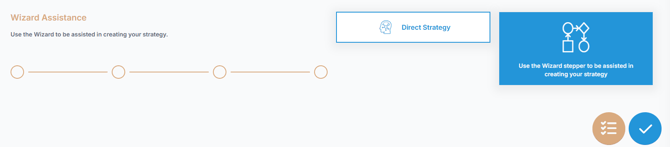
📌Step 1 - Choose the framework
- The framework is selected within the organization settings.
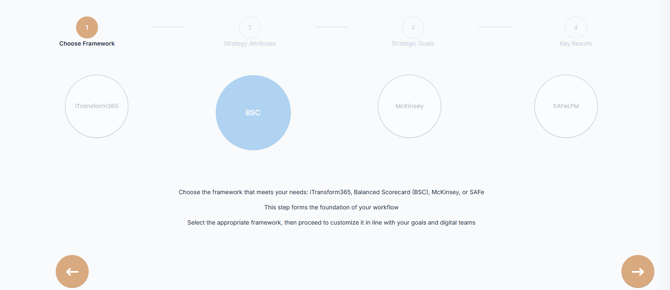
- Click the Next arrow
 to move to the next stage where you begin to define your Strategy Attributes, your Strategy Goals and Key Results.

📌Step 2: Define Strategy Attributes (Mission, Vision, Strategic Themes, Values)
A strong organizational direction begins with a clearly defined Mission, an inspiring Vision, and a set of strong Core Values. These foundational elements shape your corporate identity and act as a strategic compass for all initiatives and decision-making. Within the Balanced Scorecard (BSC) framework, they provide the context and alignment needed to ensure strategic consistency across the organization.
- Your mission defines why your organization exists.
- The vision outlines where you want to go.
- The Core values represent the principles and beliefs that guide behavior and decision-making within your organization.
- A Strategic Theme is a major area of focus that supports the organization’s mission and vision. It connects related strategic objectives under a shared goal, such as innovation, customer experience, operational efficiency, or growth. Themes help ensure alignment and structure across all strategic initiatives.
Providing detailed and specific descriptions is crucial. The more precise your inputs, the better AIZO can assist you with future tasks, suggestions, and refinements.
💡 You can activate AIZO at any time by clicking the assistance option  for real-time guidance.
1. Define your Company Mission:
-
- Click
 to open the "Add your company's Description" dialog box
 - Choose Mission from the scrolling menu.
- Enter a detailed description of your mission. Click AIZO for AI-generated suggestions.
- Click
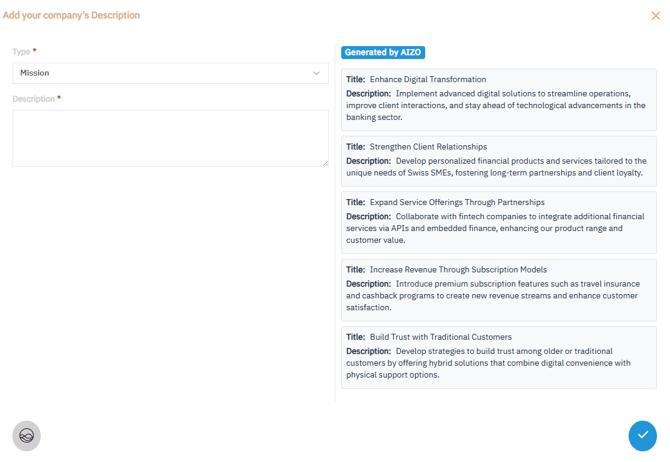
- Click
 to save.
2. Define your Company Vision:
- Click to open the "Add your company's Description" dialog box
- Choose Vision from the scrolling menu.
- Enter a detailed description of your vision. Click AIZO for AI-generated suggestions
- Click
 to save.
3. Define your Company Values
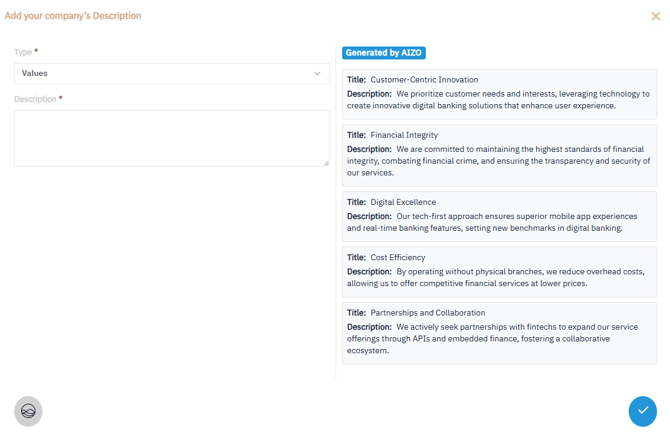
- Select to open the "Add your company's Description" dialog box
- Choose Values from the Scrolling Menu.
- Enter a clear description of a core value that guides your company's behavior and decision-making. D
- Click
 to save your first Value. Repeat steps 1-3 to add up to 10 core Values
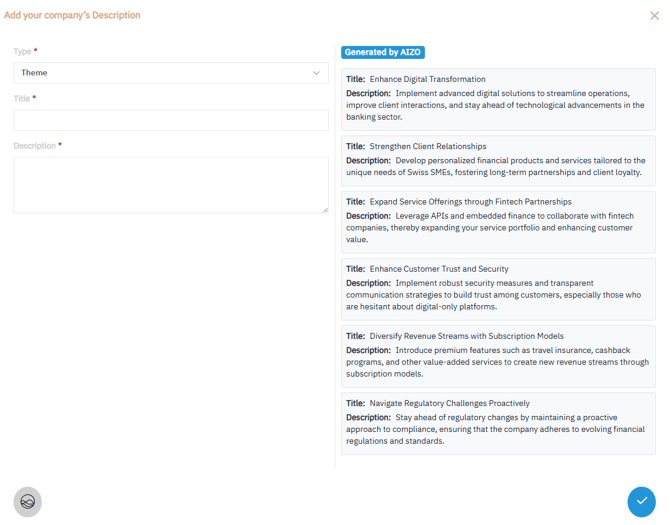
4. Define your Company Strategic Themes
- Select to open the "Add your company's Description" dialog box
- Choose Theme from the Scrolling Menu.
- Enter a clear description of the Theme that supports the organization’s mission and vision
- Click to save your first Theme. Repeat same steps to add more Themes
Once all your strategy attributes are defined, Click the Next arrow icon  to move to the next stage where you will define your Strategy Goals

📌Step 3: Define your Company Strategic Goals
Strategic Goals represent the organization’s high-level objectives, while Key Results provide measurable indicators of success.
1. Click to open the "Add your company's strategic Goal" dialog box.
2. Select one Theme and one Perspective
The BSC examines an organization from four different perspectives to help develop Strategic Goals.
- Financial : views an organization’s financial performance and the use of financial resources
- Customer : views organizational performance from the perspective of the customer or key stakeholders the organization is designed to serve
- Internal Business Process: views the quality and efficiency of an organization’s performance related to the product, services, or other key business processes
- Learning & Growth: views human capital, infrastructure, technology, culture, and other capacities that are key to breakthrough performance.
Choose the perspective corresponding to the strategic goal you wish to add.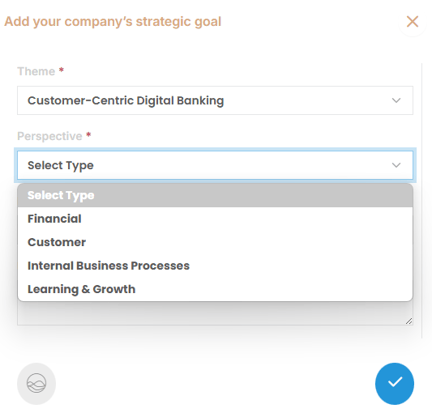
3. Provide a detailed description of the goal. Activate AIZO for AI-generated suggestions
4. Click to save.
5. Repeat steps 1–3 to add more Strategic Goals as needed.
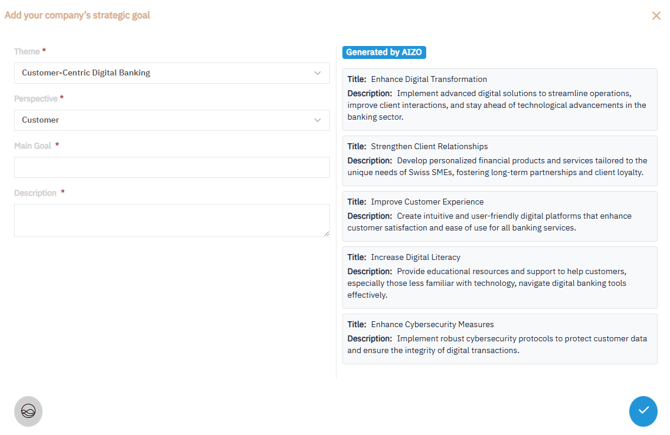
After defining all strategic goals, Click the Next arrow icon  to move to the next stage where you will define your your Key results

📌Step 4: Define Key Results
1. Click  to open the "Add your company's Key Result" dialog box:
2. Complete the Following Fields:
- Strategic Goal: Choose the Strategic Goal this Key Result is linked to from the scrolling list.
- KR Title: Choose a clear, concise title summarizing the Key Result.
- Action: Define your action plan for achieving this Key Result.
- Frequency: Select the desired Key Result Tracking frequency.
- When: Specify the timeline for achieving the Key Result.
- Reason: Explain why this Key Result matters and how it aligns with your broader strategy.
- Initial and Target Values: Set measurable initial and target values to track progress and success.
- Description: Describe what success looks like for this Key Result.
3. Click to save your Key Result.
4. Repeat to add more Key Results as needed.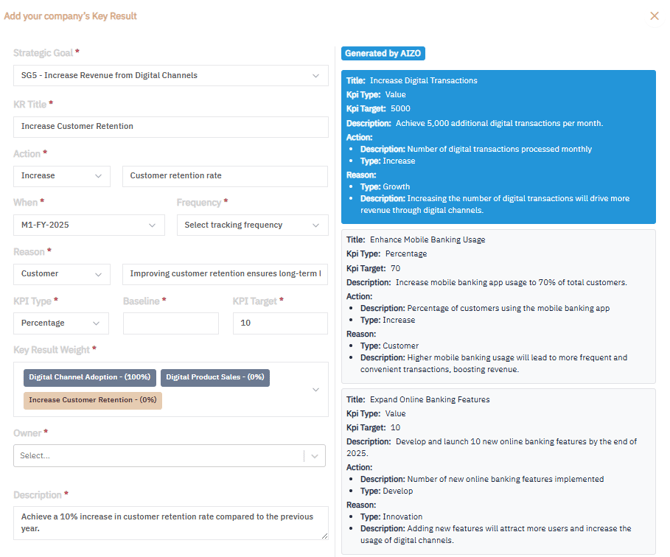
Once complete, click and then Validate to finalize and display the Balanced Scorecard View.
📊Balanced Scorecard View
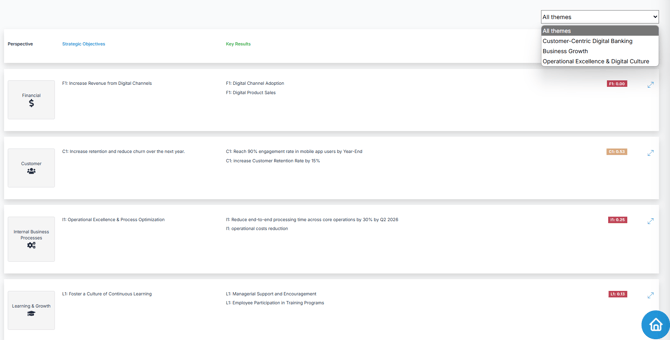
After validation, the Balanced Scorecard View provides a structured, visual summary of your strategy. It includes:
- All Strategic Goals, organized by Perspective (e.g., Financial, Customer, Internal Processes, Learning & Growth) and grouped under their corresponding Strategic Theme.
- The Key Results associated with each goal, enabling clear tracking of progress and alignment
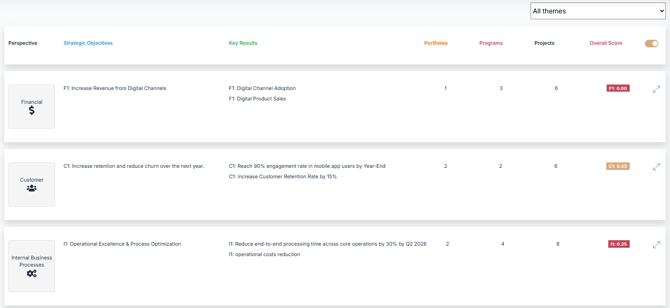
Note : During strategy execution, you can switch to the Extended Balanced Scorecard View to gain deeper insights. This enhanced view includes:
- All Strategic Goals, organized by Perspective and grouped under their corresponding Strategic Themes
- The Key Results associated with each goal, enabling clear tracking of progress and alignment
-
Linked Portfolios, providing visibility into how investments support strategic goals
-
Associated Programs that drive the implementation of key initiatives
-
Related Projects, ensuring tactical execution is aligned with strategic intent
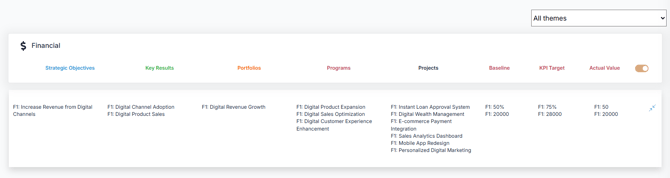
You can expand each Perspective to see more details and deepen your strategic analysis.
✅ Summary
The Balanced Scorecard Wizard Stepper in AIZOPlan offers a guided, structured approach to building and visualizing your organization's strategy. By defining your mission, vision, Strategic Themes, values, strategic goals, and key results across the four BSC perspectives, you create a comprehensive and actionable strategy framework.
For ongoing guidance, don't forget to activate AIZO for real-time support and intelligent recommendations throughout the process.