
Overview
This guide will help you perform a Digital Maturity Assessment (DMA) of your organization using iTransform365 Model. The DMA enables you to:
-
Evaluate your current and desired states across strategic digital & IA pillars.
-
Identify capability gaps and opportunities for growth.
-
Receive actionable recommendations to guide your transformation journey.
- Build a roadmap for Digital and AI maturity.
-png.png?width=328&height=202&name=image%20(6)-png.png)
📃 Step 1: Select your DMM :
Access the Digital Maturity Model (DMM) Library:
-
In your Portfolio Office, open the Portfolio Studio.
-
Click Start your Digital Maturity Assessment Assistant
-
Validate — Click the
 icon to access the DMM Library
Select or Generate a DMM
You can either choose a pre-existing model or generate a tailored one using AIZO, your AI Assistant.
Available Frameworks for DMM:
-
iTransform365: A comprehensive digital transformation structure based on 5 pilars.
-
McKinsey Framework: Aligns digital initiatives with core business strategies.
-
Microsoft Framework: Focuses on leveraging Microsoft technologies.
- Columbia Business School (David Rogers): Based on five transformation domains — Customers, Competition, Data, Innovation, and Value.
💡 AIZO can guide you in selecting the framework that best aligns with your organization’s needs.
Option 1: Select from Library
-
Click Maturity Model Library
-
Select the iTransform365 Model
-
Click
 Next to preview and customize
Option 2: Generate with AIZo
-
Select AIZO > Click
Next -
Choose Language > Industry > iTransform365 Framework
-
Validate — Click the
icon, then Next to customize your model
🔧 Step 2: Customize your DMM :
Digital maturity varies across organizations — even within the same industry. Customization allows you to tailor the assessment to reflect your company’s unique context.
Model Structure for iTransform365 Framework:
-
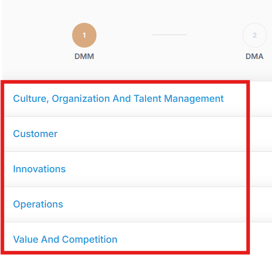
Strategic Pillars: High-level focus areas
-
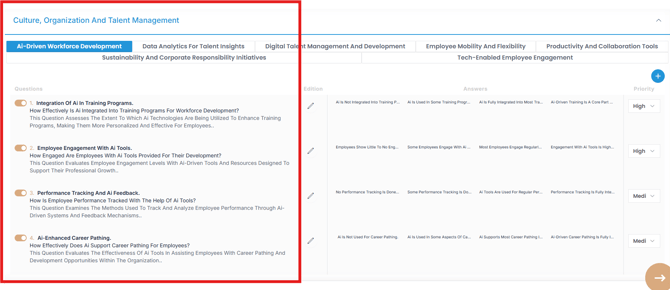
Capabilities: Functional competencies within each pillar

-
Enablers: Presented as questions used to assess maturity across each capability. Answers are presented from least to most mature.
Customization Options
- Edit a Question:
Click the Edit next to the item you want to update.
Modify the title, content, or answers.
Validate — Click the
icon to confirm and save changes. - Add a New Question:
Click to add a new question.
Fill in: Title, Question, and Maturity Level answers (least to most mature).
Validate — Click the icon to validate and save. - Set Question Priority:
Assign a priority (High, Medium, Low) from the dropdown list.
-
Remove a Question:
Simply Deselect any irrelevant question.
Once you're done, click Next to begin your assessment.
📊 Step 3: Run Your Digital Maturity Assessment
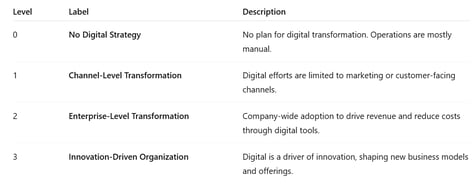
For each Enabler in your customized model, answers are proposed from least to most mature.
-
Select your Actual State (0 to 3), representing your current maturity level
-
Select your Desired State (0 to 3), reflecting your target future state
-
Hover over answer options for detailed descriptions
You don’t have to complete all pillars at once—you can work on a single pillar of your DMA and return to the others later. A DMA remains "In Progress", editable, and can be updated anytime, unless it has been archived.
📈 Step 4: Generate Recommendations
Once all questions have been answered, click Next to generate tailored recommendations.
For each question, click the Recommendation field to open its detailed dialog.
You have three options to generate recommendations:
-
Select from Library – Browse and choose from a library of predefined recommendations.
-
Add Custom Recommendation— Click
to add a new, custom recommendation tailored to your specific needs. -
Use AIZO—Generate AI-powered recommendations with AIZO. Review and remove any that do not align with your organization’s goals.
Validate — Click to save your selected recommendations.
Visualize Summary:
Click Next to view a comprehensive summary of your Digital Maturity Assessment (DMA) results.
In the summary dashboard, you can explore:
-
Your overall maturity level
-
Maturity level per pillar and per capability
-
Filling rate for each section of the assessment
-
The number of recommendations linked to each capability
These visual insights help you quickly identify areas of strength, uncover capability gaps, and prioritize strategic actions across your portfolio.
Refine Recommendations using the Value Matrix
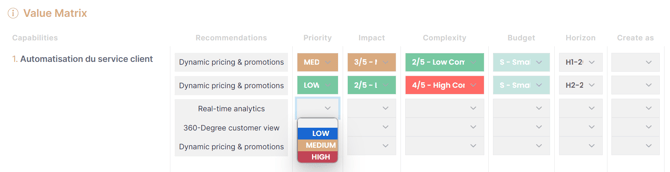
Click Next to access the Value Matrix, where you can refine recommendations by filling the following fields:
-
Priority: Low, Medium, High
-
Impact: Very Low to Very High
-
Complexity: Very Low to Very High
-
Budget: Small to Extra Extra Large
-
Horizon: Define the implementation time frame
-
Create As: Convert into Portfolio, Program, or Project
📆 Step 5: Generate Backlog
Click Next to proceed to the Value Creation phase.
-
Select from the generated Strategic Initiatives and Digital & AI Solutions tailored to your assessment.
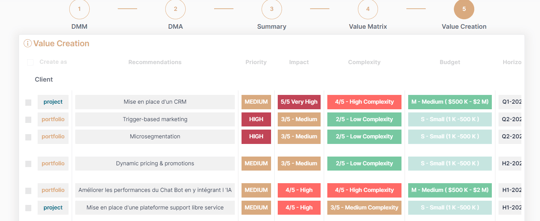
-
Click Validate
to generate selected recommendations in to your Portfolio, Program, and Project backlogs. -
Once finalized, you can archive your DMA to preserve it as a reference point. Archived DMA are not editable.
Your Digital Maturity Assessment is now complete.
It will be saved in the Maturity Model Library and archived for future reference.
✅Summary
Completing a Digital Maturity Assessment (DMA) with AIZOPlan gives you a structured, data-driven foundation for digital and AI transformation. By evaluating your current and desired maturity levels, customizing the assessment to your organizational context, and generating actionable recommendations, you create a clear roadmap for progress.
Use your DMA insights to prioritize investments, align initiatives with strategic goals, and continuously monitor growth. And remember—AIZO is here to support your journey every step of the way.