
Overview
Portfolio-level changes span multiple programs and strategic initiatives, often aligning with enterprise-wide goals. These changes typically affect a broad range of stakeholders, require executive sponsorship, and involve significant shifts in priorities, resources, or organizational direction.
Given their scope and complexity, portfolio-level changes demand a structured approach to managing both operational execution and individual adoption. The ADKAR model helps ensure the human side of change is addressed across all impacted groups.
This guide walks you through how to initiate, monitor, and manage portfolio-level changes using the Change Management Studio with the ADKAR model providing a framework to support individual and organizational adoption.
What is the ADKAR Model?
ADKAR is a practical and widely adopted change management model designed to guide both individual and organizational transformation. It outlines five key building blocks individuals need to move through for a change to be successful:
-
Awareness – Understanding why the change is necessary
-
Desire – Having the motivation to support and participate in the change
-
Knowledge – Knowing how to change and what the change involves
-
Ability – Developing the skills and behaviors needed to implement the change
-
Reinforcement – Sustaining the change through continued support and recognition
By focusing on these elements, ADKAR helps ensure that change is not only implemented but fully adopted and sustained.
📌Step1-Access the Change Management Studio
To access the Change Management Studio, use one of the following paths:
- Option 1: From the main menu, navigate to
Portfolio → Manage → Change Management Studio - Option 2: Open Change Management Studio directly from the Portfolio Office.
📌Step2-Create a Change Canvas
The Change Canvas captures the context, reasoning, and outcomes associated with the portfolio-level change.
- Choose the relevant portfolio from the scrolling list.
- Fill in the following fields to create a complete change overview:
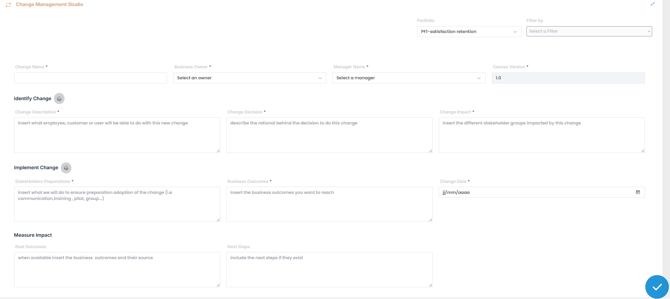
General Information
| Field | Description |
|---|---|
| Change Name | Title of the change initiative |
| Business Owner | Executive sponsor or accountable leader for the change |
| Manager Name | Person responsible for managing and executing the change |
Identify the Change
| Field | Description |
|---|---|
| Change Description | Describe what employees, customers, or users will be able to do differently |
| Change Decision | Explain the rationale or business case for initiating the change |
| Change Impact | Identify the stakeholder groups or departments affected by this change |
Implement the Change
| Field | Description |
|---|---|
| Stakeholder Preparation | Outline the communication, training, and readiness activities planned for adoption |
| Business Outcomes | Define the specific outcomes or goals this change is intended to achieve |
| Change Date | Indicate the planned implementation date for the change |
Measure the Impact
| Field | Description |
|---|---|
| Real Outcomes | Once available, document the actual results of the change and their sources |
| Next Steps | Include any follow-up actions or next steps required after implementation |
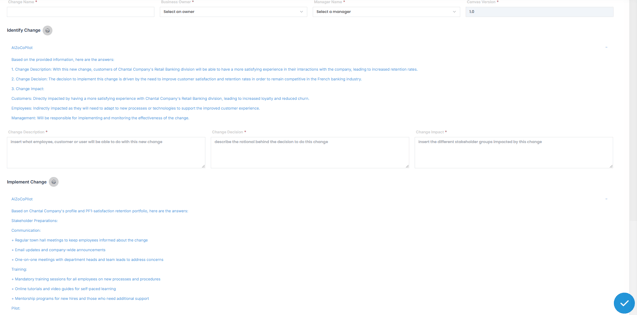
💡 Use AIZO
Click the AIZO icon  to review AI-generated suggestions based on your context and industry. Copy, customize, and paste the recommendations directly into the appropriate fields to save time and enrich your Change Canvas.
📌Step3-Add a Change Action
After defining your Change Canvas, break the change into actionable steps by creating one or more Change Actions
A Change Action refers to a specific, tactical activity designed to support one of the five stages of individual or organizational change:
Awareness → Desire → Knowledge → Ability → Reinforcement
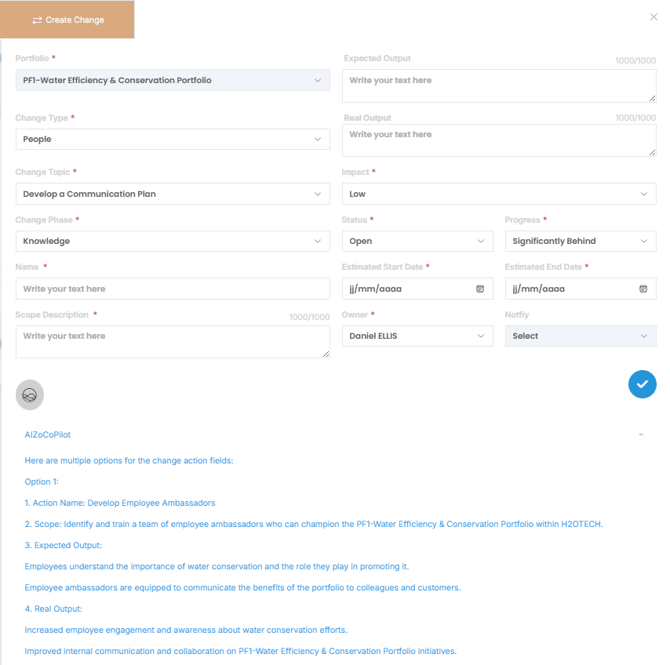
1. Click  to open the "Create Change" dialog box and fill the required fields. Click the AIZO icon
  to receive context-aware recommendations. Copy, customize, and paste into the appropriate field
| Field | Description |
|---|---|
| Name | Action title |
| Change Type |
Classifies the nature of the change: |
| Change Topic | Main theme or domain of the change |
| Change Phase | select one of ADKAR phase: Awareness, Desire, Knowledge, Ability, Reinforce |
| Scope Description | Summary of what’s affected or in scope |
| Expected Output | Intended outcomes of the change action |
| Real Output | Actual or anticipated results |
| Impact | Assess the potential impact: Low, Moderate, High, Extreme |
| Status | Current status of the action |
| Progress | Describe progress to date |
| Estimated Start/End Dates | Timeline for this action |
| Owner | Person accountable for the action |
| Notify | Users or groups to be informed |
2. Click  to save your change record.
✏️Managing an existing Portfolio Change
To modify an existing change:
1. Select the associated portfolio from the list in the Change Management Studio.

2. Click the "Edit"  next to the change you want to update.
3. Update any fields in the Change Canvas or Change Actions as needed.
4. Click to save your changes and ensure they are reflected in the portfolio record.
✅ Summary
Managing change at the portfolio level requires more than just strategic alignment—it demands a structured, people-focused approach. By combining the Change Management Studio with the ADKAR model, you can ensure that each change initiative is clearly defined, effectively executed, and fully adopted across programs and stakeholders. The Change Canvas helps document the rationale and scope of change, while Change Actions provide tactical steps for implementation and adoption.
With the support of AIZO, you can streamline planning, generate context-aware suggestions