
Overview
Dependencies are links between projects or tasks where one element relies on the progress or completion of another.
Effective dependency management helps reduce risk, improve coordination, and keep the program on schedule.
This article explains how to use the Dependencies Management Studio to formally define, track, and manage cross-project dependencies, and how to use the Dependencies Planning View to visualize relationships between projects
📌Access Dependencies Management Studio
Use the Dependencies Management Studio to formally add and manage dependencies between projects or workstreams.
-
Go to Project > Project Office.
-
Click the "Dependencies Management Studio" icon
 .
.

Create a New Dependency
- Click
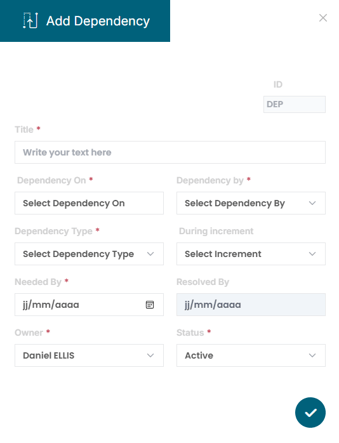
 to open the "Add Dependency” dialog box and complete the required fields:
- Title : Give the dependency a clear, meaningful name
- Dependency On : Select the project or workstream that is being depended on
- Dependency By : Select the dependent project or workstream
- Dependency Type : Choose the relationship type:
- Finish-to-Start (FS)
- Start-to-Start (SS)
- Finish-to-Finish (FF)
- Start-to-Finish (SF)
- During Increment : Specify the Value Increment if applicable
- Needed By : Define the target completion date for the dependency
- Owner : Assign responsibility for tracking and managing the dependency
- Status : Set the current status: Active, On Hold, Canceled, Resolved
- Click
 to save the dependency
🔄Monitor and Adjust Dependencies
Use the Dependencies Management Studio to maintain and update dependencies over time. You can:
-
Track dependency status over time
-
Reassign owners if responsibilities shift
-
Update “Needed By” dates if schedules change
-
Mark dependencies as resolved or canceled when appropriate

🔍Visualize Dependencies with the Dependencies Planning View
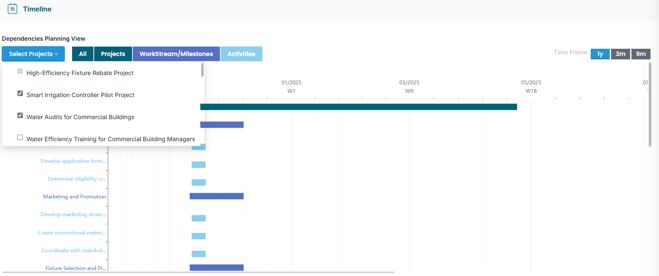
Use the Dependencies Planning View to visualize relationships between projects
1. Access the Dependencies Planning View:
-
Go to your Project Studio.
-
Click
 to open the Project Canvas for the selected project
 -
Click the Timeline section to open the Dependencies Planning View
-
Click “Select Project”
-
Choose related projects to view interdependencies
✅ Summary
By using the Dependencies Management Studio, you can formally define relationships between projects, assign ownership, and monitor status over time.
The Dependencies Planning View complements this by offering a visual perspective of inter-project connections, helping you identify overlaps, avoid bottlenecks, and maintain alignment across all workstreams.