
Overview
Portfolio-level risks are high-impact uncertainties that can affect strategic outcomes, investment priorities, and organizational alignment.
By proactively identifying and managing portfolio risks, organizations can ensure that strategy execution stays on track, even in the face of shifting priorities, market changes, or resource constraints.
This article explains how to manage risks at the portfolio level using the Risk Management Studio. It covers how to add, update, and categorize risks using the ROAM framework, and shows how AIZO can enhance risk management by providing intelligent, portfolio-specific recommendations
Understanding the ROAM framework
The ROAM framework helps you categorize and track risks based on how they are handled:
| ROAM Status | Meaning |
|---|---|
| Resolved | The risk is no longer a threat or has been neutralized. No further action is needed. |
| Owned | The risk is still active, and a specific person/team is responsible for managing it. |
| Accepted | The risk cannot be avoided or mitigated and must be accepted. Plans are in place to respond if it occurs. |
| Mitigated | A mitigation strategy is in place to reduce the impact or likelihood of the risk occurring. |
📌Step1-Access the Risk Management Studio
To access the Risk Management Studio, use one of the following paths:
- Option 1: From the main menu, navigate to
Portfolio → Manage → Risk Management Studio - Option 2: Open the Risk Management Studio directly from the Portfolio Office.
📌Step2- Add a new Risk
1. Select the Portfolio in which you want to add an new risk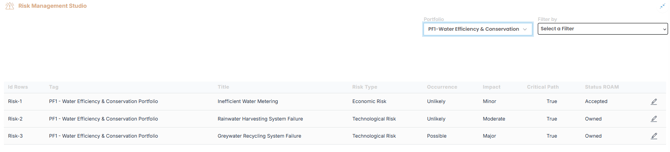
2. Start by clicking  to open the “Create Risk” dialog box.
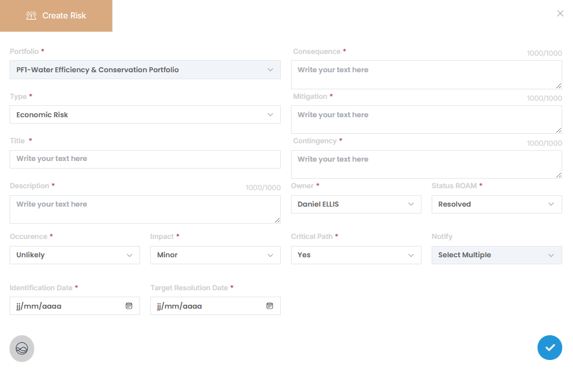
| Field | Description |
|---|---|
| Type | Choose the risk type: Economic, Regulational,Technical, Organizational or Management Risk |
| Title & Description | Add a concise title and a clear, detailed description of the risk |
| Occurrence | Select: Unlikely, Possible, or Likely based on probability |
| Impact | Select: Minor, Moderate, or Major based on expected consequences |
| Identification Date | Date the risk was identified |
| Target Resolution Date | Deadline for resolving or managing the risk |
| Consequence | Describe what may happen if the risk materializes |
| Mitigation | Outline the actions to reduce or eliminate the risk before it occurs |
| Contingency | Provide a backup plan to minimize impact if the risk occurs |
| Owner | Assign responsibility to a team member or role |
| ROAM Status | Choose how the risk is currently being managed : Resolved, Owned, Accepted, Mitigated |
| Critical Path | indicate whether the risk directly impacts the critical path of the portfolio : Yes or No |
💡Use AIZO
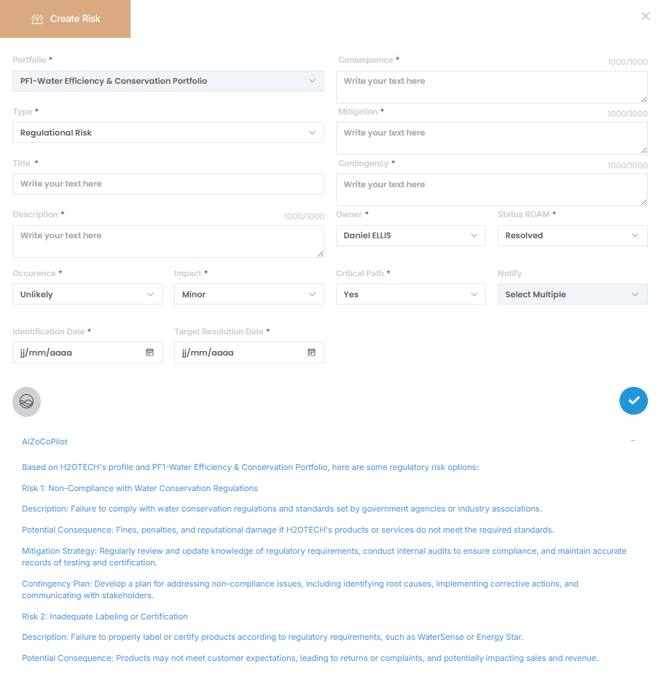
AIZO your AI-powered assistant, can support you throughout the risk management process. It helps you develop, refine, and manage risks by suggesting relevant descriptions, mitigation strategies, contingency plans, and ROAM classifications based on portfolio context. This accelerates risk entry, improves consistency, and ensures that risk documentation is comprehensive and aligned with best practices.
Simply Click AIZO icon  while filling out risk fields to receive intelligent suggestions tailored to your portfolio type and risk category. See below for an example :
✏️Manage an existing Risk
1. Select the Portfolio from the list where the risk is registered
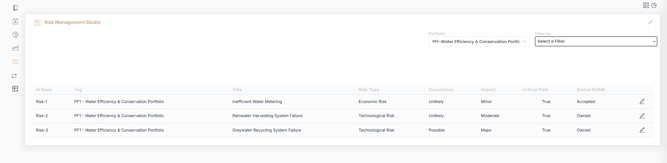
2. Apply filters if needed (Occurrence, Impact, ROAM Status) to find the risk faster.
3. Click Edit on the risk you want to update
4. Modify the relevant fields.
5. Click  to save your changes
✅Summary
By leveraging the Risk Management Studio and applying the ROAM framework, organizations can systematically identify, categorize, and act on critical risks.
With the support of AIZO, you can speed up the risk documentation process, improve consistency, and create robust mitigation strategies—ensuring your portfolios remain resilient and strategically aligned in the face of uncertainty.