
Overview
This article provides a step-by-step guide to tracking Cost Performance Index (CPI) and Schedule Performance Index (SPI) using the Budget Studio within the Project Canvas. These performance indicators help you evaluate budget efficiency and schedule adherence at the project and sprint levels.
📌Step 1-Accessing the Project Canvas
1-Access the Project Backlog from two locations:
-
Via Project Studio
Navigate to:Project > Develop > Project Studio -
Via Project Office
Expand the Project Backlog panel within the Project Office workspace.
The Project Backlog gives you a centralized view of all your projects, including their current status.
2- Open the Project Canvas
In the Project Backlog, click Edit icon  next to the desired project to open its Project Canvas.
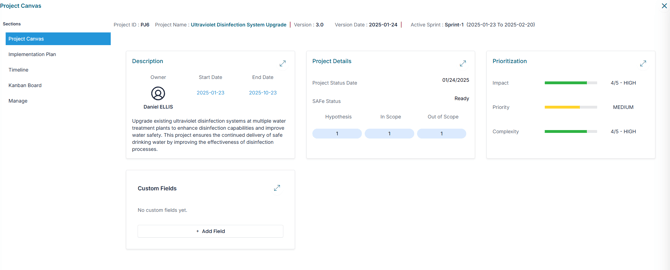
📌Step 2-Accessing the Budget Studio in the Project Canvas
-
In the Project Canvas, go to the Manage Section
-
Expand the Budget tab to access the Budget Studio
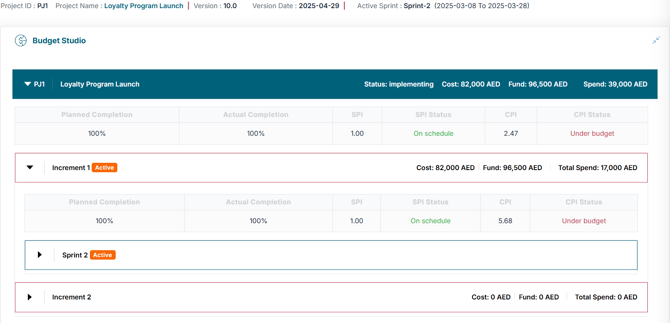
You’ll also see a Project bar showing:
- Project name and its status
- Project Cost and Project Fund
- Total Project Spend, including amounts from both active and closed sprints.
📈 Step3-Tracking Performance Indicators
Within the Budget Studio, performance metrics are available at the Project, Value Increment, and Sprint levels, including:

-
Planned Completion – The % of work that should be completed based on the original schedule
-
Actual Completion – The % of work completed based on validated deliverables
-
Schedule Performance Index (SPI) and SPI Status
-
Cost Performance Index (CPI) and CPI Status
💰 Cost Performance Index (CPI)
📌 What is CPI?
CPI measures how efficiently project costs are being managed.
Formula:CPI = Earned Value ÷ Actual Cost
Interpretation:
-
CPI > 1 → Project is under budget
-
CPI = 1 → Project is on budget
-
CPI < 1 → Project is over budget
Tracking CPI regularly helps maintain financial control and ensures alignment with the allocated budget.
🕒 Schedule Performance Index (SPI)
In addition to cost, it's essential to monitor your project’s Schedule Performance Index (SPI) to evaluate progress against the planned timeline.
📌What is SPI?
SPI measures schedule efficiency—how well the project is performing relative to its planned progress.
Formula:SPI = Earned Value ÷ Planned Value
Interpretation:
-
SPI > 1 → Project is ahead of schedule
-
SPI = 1 → Project is on schedule
-
SPI < 1 → Project is behind schedule
Monitoring SPI helps improve forecasting, supports proactive adjustments, and mitigates schedule-related risks.
CPI and SPI used together provide a comprehensive view of both cost and schedule performance—essential for project health monitoring, informed decision-making, and proactive management.
✅Summary
The Budget Studio in AIZOPlan's Project Canvas provides key insights into cost and schedule performance through CPI and SPI indicators. By regularly monitoring these metrics, project managers can make informed decisions, stay aligned with budgets and timelines, and improve overall project outcomes. Together, CPI and SPI offer a complete view of project efficiency and delivery health.