
Overview
AIZOPlan provides a suite of dedicated Demand Management dashboards designed to help you monitor the lifecycle, budget status, and investment readiness of incoming demands across your portfolios. These dashboards offer actionable insights to support prioritization, funding decisions, and execution planning.
This article walks you through the five dashboards available in the Demand Management Studio.
📌Accessing the Demand Management Dashboard
- To Open the Demand Management Studio from the main navigation
Portfolio → Plan → Demand Management Studioor directly from the Portfolio Office. - Click the Dashboard tab to access the dashboards.

Demand Management-wide summary
At the top of the dashboard section, you’ll find a high-level summary that provides a quick snapshot of overall demand and investment activity:
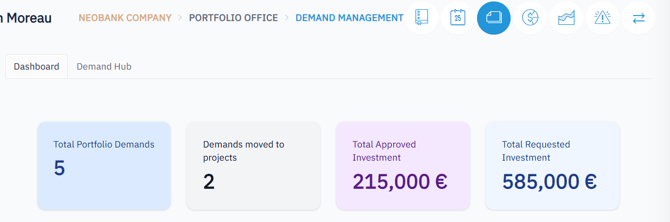
| Metric | Description |
|---|---|
| Total Portfolio Demands | Total number of demands submitted across all portfolios |
| Demands Moved to Projects | Number of demands that have been approved and converted to projects |
| Total Requested Investment | Total budget requested by all demands |
| Total Approved Investment | Total budget that has been validated and approved |
Use this view to assess demand volume, execution readiness, and funding coverage at a glance.
📋 Portfolio List Dashboard
This dashboard gives you a portfolio-level overview of all linked demands and their budget status.
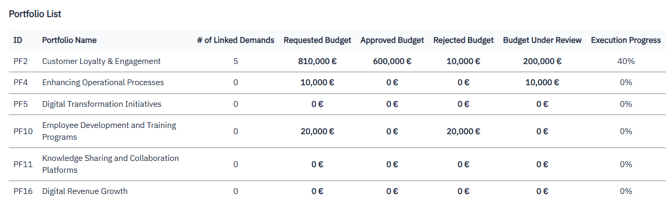
| Metrics |
|---|
| Portfolio ID and Name |
| Number of Linked Demands |
| Requested Budget |
| Approved Budget |
| Rejected Budget |
| Budget Under Review |
| Execution Progress (%) |
Use this dashboard to:
-
Track how many demands are associated with each portfolio
-
Compare budget request and approval ratios
-
Monitor execution progress at a glance
📌 Demand Conversion by Portfolio
This dashboard provides a global count of demands across all portfolios.
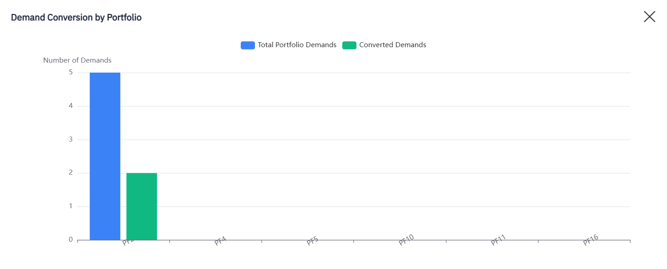
| Metrics | Description |
|---|---|
| Total Portfolio Demands | Total Number of Demands per Portfolio |
| Converted Demands | Number of Converted Demands (to Projects) |
Use this dashboard to:
-
Understand overall demand volume
-
Track the demand conversion rates
💰 Budget Distribution by Portfolio
This dashboard focuses on budget status for all demands within each portfolio.
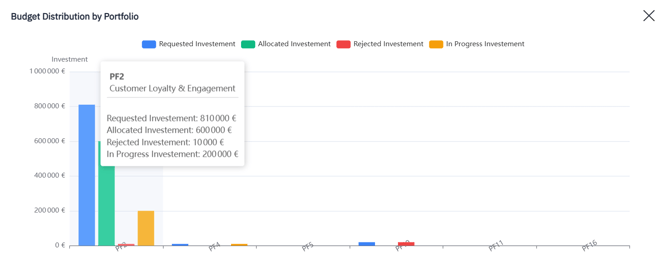
| Metrics |
|---|
| Requested Investment |
| Allocated Budget |
| Rejected Budget |
| Investment In Progress |
Use this dashboard to:
- Compare requested vs. approved investment amounts
- Identify underfunded or pending demands
- Review allocation trends across portfolio
🔍 Demand-Level Budget vs Actual Investment
This view enables side-by-side comparison of investment planning vs. actual spend for individual demands
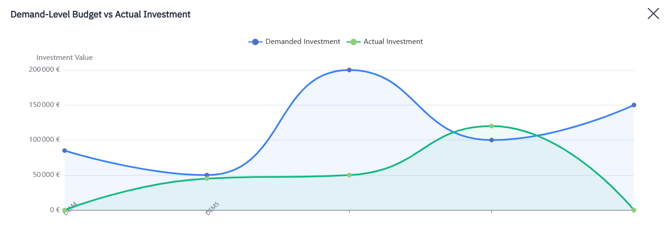
| Metrics |
|---|
| Demanded Investment |
| Actual Investment |
Use this dashboard to:
-
Track variance between estimated and actual investment
-
Flag over- or under-funded initiatives
-
Support financial forecasting and adjustment decisions
📊 Demand Status Distribution Dashboard
This dashboard shows how demands are distributed across different lifecycle stages.
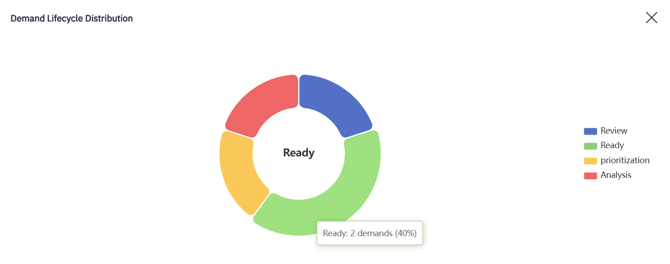
| Demand Stages Tracked |
|---|
| Review |
| Analysis |
| Ready for Prioritization |
| Prioritization |
Use this dashboard to:
-
Understand where demands are concentrated in the lifecycle
-
Identify bottlenecks or delays
-
Plan for next-stage readiness and approvals
✅ Summary
AIZOPlan’s Demand Management dashboards provide full visibility into the intake, evaluation, and investment status of your demands. By leveraging these dashboards, you can:
-
Monitor demand maturity and readiness across portfolios
-
Align budget decisions with strategic value and investment readiness
-
Accelerate prioritization and improve execution timelines
-
Ensure consistent, data-driven decisions across your demand pipeline