
🔍 Overview
The Global Budget Dashboard provides a consolidated view of budgets, spending, and forecasts across all portfolios, programs, and projects.
It enables PMOs, Finance teams, and Executives to monitor budget consumption, burn rate, forecast accuracy, and cost structure—supporting strong financial governance and informed investment decisions at enterprise scale.
📌 Accessing the Global Budget Dashboard
To access the dashboard, navigate to:
Program → Track → Global Budget Dashboard

You can refine the analysis using the following filters:
-
Year
-
Portfolio
-
Program
📌 Exploring the Global Budget Dashboard Components
1️⃣Total Budget vs Spend
Displays the overall budget consumption compared to the total allocated budget.
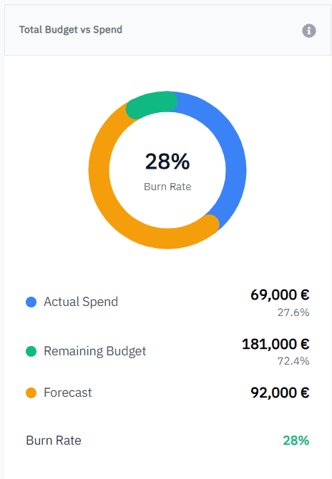
Key indicators include:
-
Actual Spend
-
Remaining Budget
-
Forecast
-
Burn Rate (%)
💡 This section helps monitor monitor the budget consumption rate, quickly identify overspending risks, and manage the remaining budget and burn rate.
2️⃣Budget Distribution by Level
Shows how the total budget is distributed across portfolio, program, and project levels.
-
Forecast Accuracy is calculated as Total Spend / Total Funding
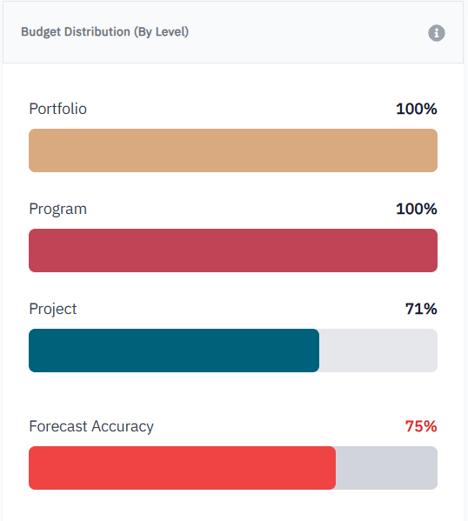
💡 Provides visibility to assess budget alignment with strategic priorities, identify concentration areas, and support budget reallocation and prioritization decisions.
3️⃣Forecast Accuracy
Displays the accuracy of financial forecasts compared to actual spend.
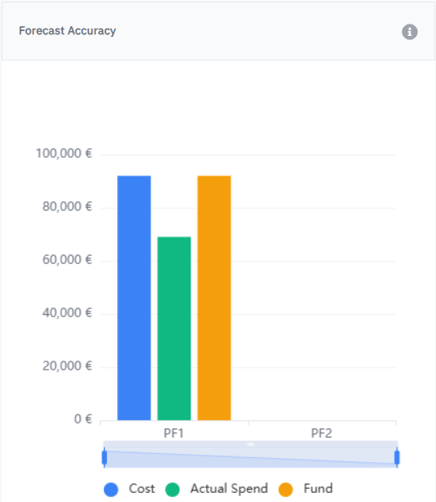
💡 Compares planned budgets, actual spend, and forecasted values over time.
This view helps to evaluate forecast reliability, anticipate end-of-period variances, and adjust forecasts to secure financial outcomes.
4️⃣Budget by Portfolio
-
Allocated budget
-
Actual spend
-
Remaining budget
-
Variance percentage
-
CPI (Cost Performance Index)
-
Financial status

💡 Enables quick identification of portfolios requiring financial attention.
5️⃣Program Funding Allocation
Displays how budgets are allocated across programs within portfolios.
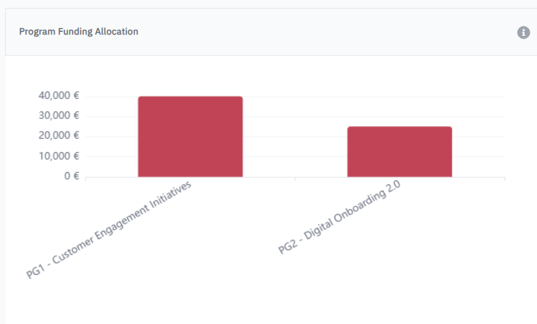
💡 Helps understand funding distribution at program level, identify high-budget programs, and support prioritization decisions.
6️⃣Budget Allocation by Project
Shows budget allocation across individual projects.
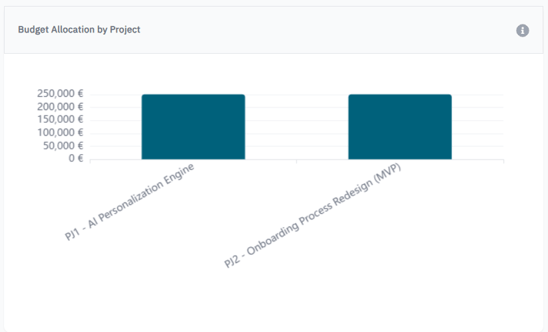
💡 Enables analysis of project-level investment distribution and supports cost control and trade-off decisions.
7️⃣CAPEX vs OPEX
Illustrates the split between:
-
Capital Expenditures (CAPEX)
-
Operational Expenditures (OPEX)
💡 allows you to assess cost structure, ensure compliance with capitalization policies, and support financial planning and accounting decisions.
8️⃣Top Cost Categories
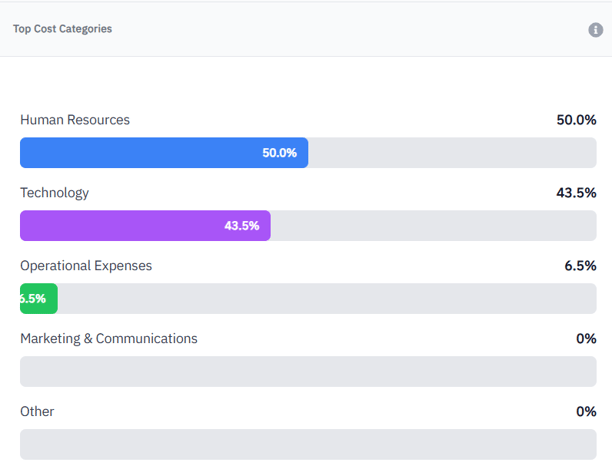
💡 Helps identify key cost drivers, monitor cost structure evolution, and focus optimization efforts on the most impactful categories.
✅ Summary
The Global Budget Dashboard enables organizations to:
-
Monitor budget consumption and burn rate across all levels
-
Improve forecast accuracy and financial predictability
-
Identify financial risks early
-
Align investments with strategic priorities