
🔍Overview
The Portfolio Dashboard in AIZOPlan provides a unified, real-time view of portfolio performance, investments, and execution health.
It enables PMOs, Finance teams, and Executives to continuously monitor:
-
Portfolio value delivery
-
Budget consumption and funding status
-
Strategic Key Results (OKRs)
-
Risks and delivery health
All insights are consolidated into a single workspace, acting as a true portfolio command center.
The dashboard aggregates live data from:
-
Demand Hub – Initiatives, prioritization, and demand scoring
-
Investment Planning Studio – Funding envelopes and validation stages
-
Program & Project Delivery – Execution progress, spend, and time tracking
-
Performance Studio – Strategic Key Results (OKRs) and KPIs
📌Accessing the Portfolio Dashboard
To access the dashboard:
Portfolio → Track → Portfolio Dashboard
You can switch the dashboard scope between:
-
All Portfolios (enterprise-wide view), or
-
A specific Portfolio (focused analysis)
This allows both executive oversight and portfolio-level deep dives.
Portfolio Summary KPIs
At the top of the dashboard, key KPIs provide an instant snapshot of portfolio health:
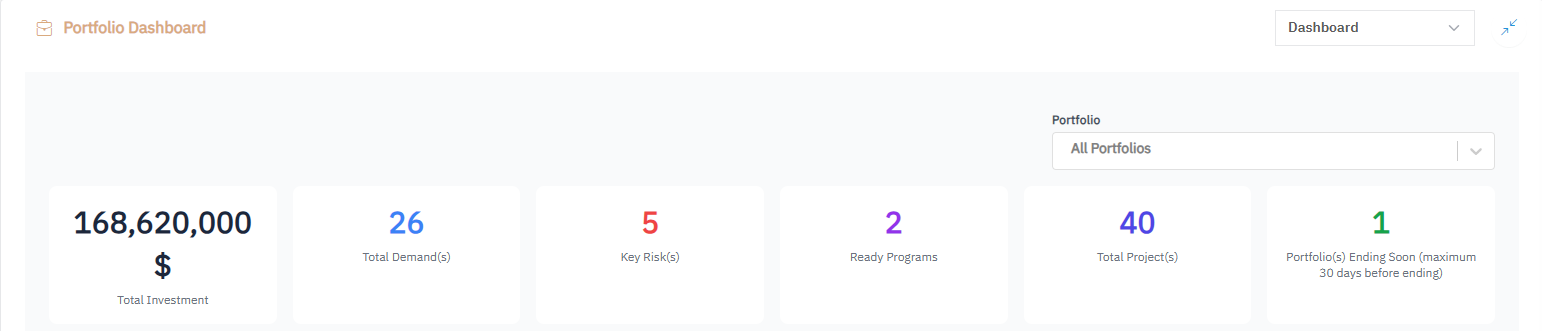
| Metric | Description |
|---|---|
| Total Investment | Total approved funding allocated to the portfolio |
| Total Demands | Number of transformation demands linked to the portfolio |
| Total Projects | Active and completed projects delivering portfolio value |
| Key Risks | Total risks currently identified |
| Active Programs | Programs currently in execution |
| Days Remaining | Remaining days before portfolio closure or fiscal cycle end |
💡 These KPIs deliver an immediate understanding of financial exposure and delivery status.
Key Results Progress
This section tracks progress and trends of portfolio-level Key Results (KRs).
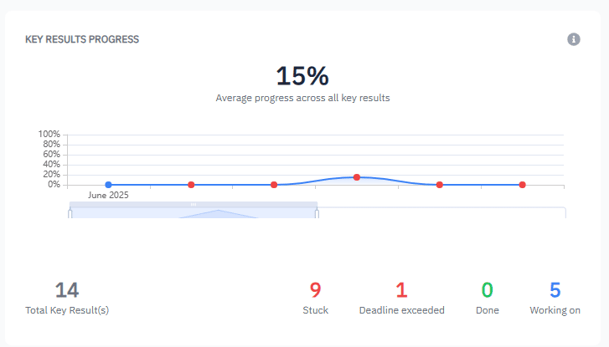
Features include:
-
Average KR completion over time (e.g., 38%)
-
Automatic highlighting of overdue Key Results
-
Status breakdown:
- Stuck – Blocked or delayed
- Deadline Exceeded – Past due
- Working On – In progress
- Done – Successfully completed
💡 Enables early detection of outcome slippage and misalignment with strategic goals.
Total Investment Distribution
Shows how portfolio investments are distributed across validation stages:
- Rejected
- Demanded
- Validation Pending
- Validated
💡 Provides transparency on funding maturity, approval flow, and investment readiness.
Total Demands by Score
Displays the number of demands categorized by score:
- Critical (0–1)
- Medium (1.0–2.5)
- High (2.5–3.5)
- Low (3.5–5)
Both flagged and unflagged demands are visible, supporting better:
- Prioritization
- Risk anticipation
- Resource allocation
💡 Quickly identify demands that require executive attention.
Key Risks Metrics
Displays portfolio risks by category:
- Budget
- Schedule
- Resource
- Technical
Each risk shows:
- Impact level (Minor, Moderate, Major)
- Trend vs previous reporting period
Risk Calculation Logic
-
If no risks, Score = 0, Category = No Risk, Trend = Down
-
Otherwise:
- Risks are weighted by impact level
- A weighted average score is calculated
- Risk category is derived:
-
-
- Low → Low Risk (↓)
- Medium → Moderate Risk (→)
- High → Critical Risk (↑)
-
💡 Provides early-warning signals on growing exposure.
Programs Health & Progress
Displays a consolidated view of all programs within the portfolio, including:
- Number of linked projects
- Allocated budget, spend, and total cost
- Time elapsed and days remaining
- Current program status (Implementing, On Hold, Closed, etc.)
💡 Enables leaders to monitor delivery velocity, financial execution, and schedule health.
Key Projects (High Impact)
Highlights projects with the highest strategic impact, displaying:
- Project score
- Current status (On Track, Off Track, Critical)
- Project owner
Each project is explicitly linked to portfolio Key Results, ensuring traceability from execution to outcomes.
💡 Helps leaders focus on the projects that drive the most value.
Portfolio Budget Consumption
Displays budget usage and timeline health across portfolios, allowing teams to assess:
- Budget efficiency
- Remaining delivery time
- Financial or schedule deviations
💡 Quickly detect underperforming or high-performing portfolios.
✅ Summary
The Portfolio Dashboard is the single source of truth for strategic execution and financial oversight in AIZOPlan.
It empowers decision-makers to:
- Monitor portfolio health in real time
- Detect risks and budget deviations early
- Align investments, execution, and outcomes