
🔍 Overview
The Program Dashboard in AIZOPlan provides a consolidated, real-time view of program execution, financial performance, risks, and delivery health.
It enables Program Managers, PMOs to monitor how programs are progressing against their objectives, budgets, timelines, and capacity constraints — all from a single dashboard.
The dashboard aggregates live data from:
-
Program planning and execution
-
Project delivery and milestones
-
Budget, fund, and spend tracking
-
Risk management
-
Resource capacity and workload
-
Performance indicators (CPI / SPI)
📌 Accessing the Program Dashboard
To access the dashboard, navigate to:
Program → Track → Program Dashboard
You can switch the dashboard scope between:
-
All Programs (cross-program oversight), or
-
A specific Program (detailed execution view)
📌 Exploring the Program Dashboard Compents
1️⃣Program Summary KPIs
At the top of the dashboard, key KPIs provide an instant snapshot of program health:
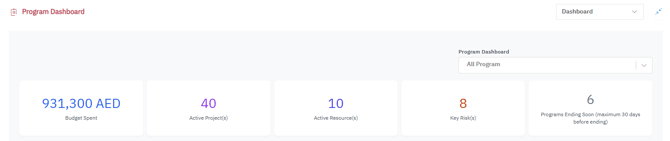
| Metric | Description |
|---|---|
| Budget Spent | Total spend across the selected program(s) |
| Active Projects | Number of projects currently active |
| Active Resources | Resources allocated to the program |
| Key Risks | Total risks identified across the program |
| Programs Ending Soon | Programs ending within the next 30 days |
💡 These KPIs help quickly assess execution intensity, financial exposure, and urgency.
2️⃣Organizations KPIS
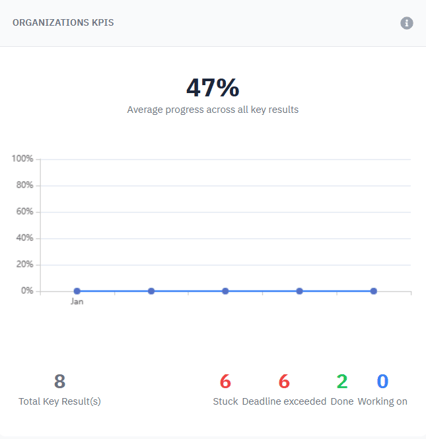
Displays the progress and trend of program-level Key Results (KRs).
-
Shows the average completion percentage across all KRs
-
Highlights overdue Key Results automatically
-
Status breakdown:
-
Stuck – Blocked or delayed
-
Deadline Exceeded – Past due
-
Working On – In progress
-
Done – Successfully completed
-
💡 Helps determine whether the program is delivering outcomes as expected.
3️⃣Budget Consumption by Quarter
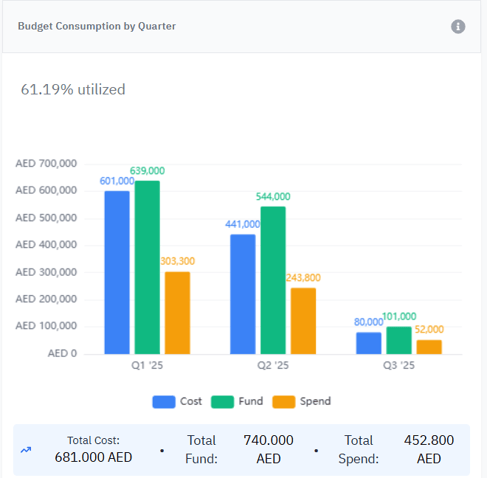
Provides a detailed financial view by quarter, including:
-
Total Cost
-
Total Fund
-
Total Spend
-
Budget utilization percentage
💡 Enables PMO and Program Managers to monitor budget consumption trends and anticipate overruns or underutilization.
4️⃣Activity Distribution by Status
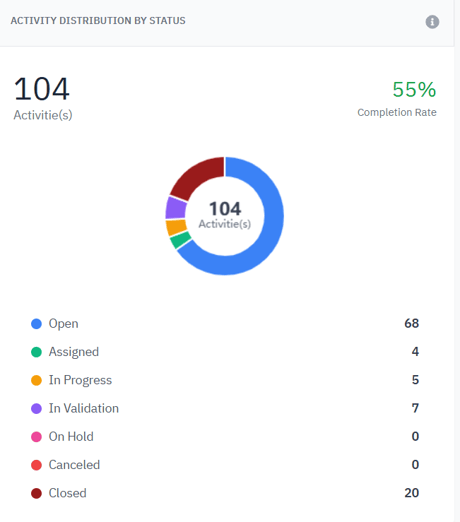
Displays the distribution of all project activities by execution status:
-
Open
-
Assigned
-
In Progress
-
In Validation
-
On Hold
-
Canceled
-
Closed
💡 This view helps track workflow progression and identify bottlenecks or stalled activities.
5️⃣Key Risks Metrics
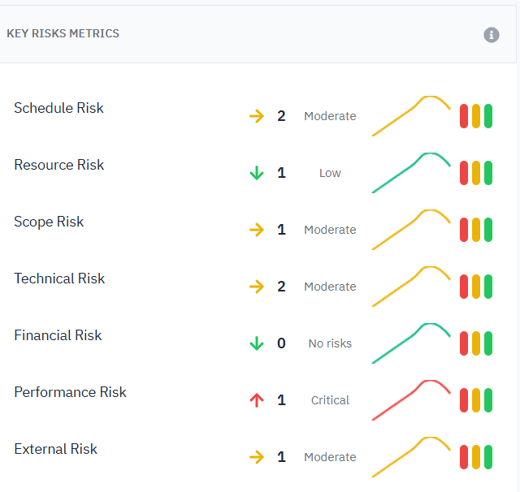
Displays the main risk metrics by category:
-
Schedule
-
Resource
-
Scope
-
Technical
-
Financial
-
Performance
-
External
Each risk category shows:
-
Number of risks
-
Impact level (Low, Moderate, Critical)
-
Trend compared to the previous reporting period
Risk Calculation Logic
-
If no risks exist → Category = No Risk
-
Otherwise:
-
Each risk is weighted by its impact level
-
A weighted average score is calculated
-
Risk level is derived:
-
Low → Low Risk
-
Medium → Moderate Risk
-
High → Critical Risk
-
-
💡 Provides early warning signals on areas where risk exposure is increasing.
6️⃣Projects Status Overview
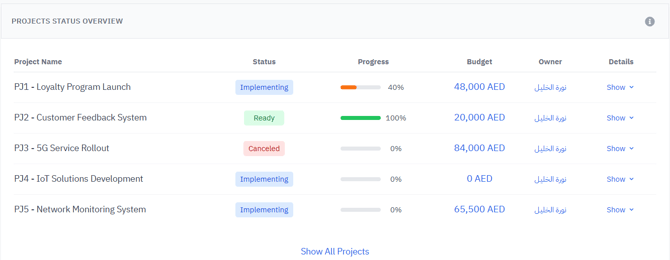
Provides an overview of all projects linked to the selected program(s), including:
-
Project status (Ready, Implementing, Canceled, etc.)
-
Progress percentage
-
Allocated budget
-
Project owner
💡 Helps track project execution health and alignment with program objectives.
7️⃣Upcoming Milestones
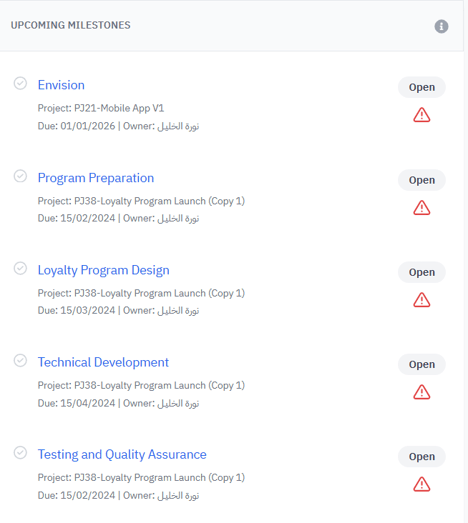
Displays all upcoming milestones for the selected program(s), including:
-
Milestone name
-
Related project
-
Due date
-
Owner
-
Current status
Automatic alerts are triggered when:
-
A milestone is approaching (less than 7 days remaining)
-
A milestone deadline is exceeded
💡 Supports proactive delivery management and timely corrective actions.
8️⃣Resources Workload
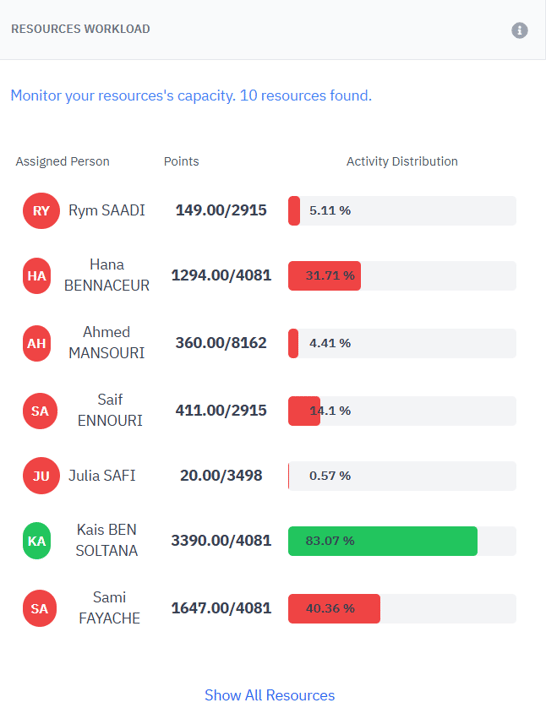
Shows the workload and capacity utilization of resources assigned to the program(s):
-
Assigned effort vs available capacity
-
Workload percentage per resource
-
Activity distribution
💡 Helps identify overloaded or underutilized resources, improving allocation efficiency.
9️⃣Projects CPI & SPI Overview by Increment
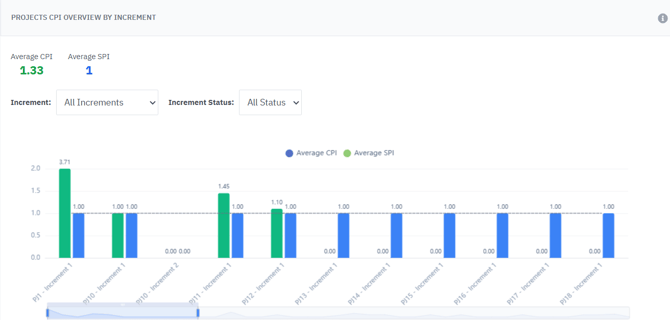
Displays performance indicators across program increments:
-
CPI (Cost Performance Index) – Budget efficiency
-
SPI (Schedule Performance Index) – Schedule performance
Interpretation:
-
CPI = 1 → On budget
-
CPI > 1 → Under budget (good performance)
-
CPI < 1 → Over budget
-
SPI = 1 → On schedule
-
SPI > 1 → Ahead of schedule
-
SPI < 1 → Behind schedule
You can filter by:
-
Increment
-
Increment status
💡 Enables precise monitoring of cost and schedule performance at increment level.
✅ Summary
The Program Dashboard is the operational command center for program execution in AIZOPlan.
It enables to:
-
Monitor delivery, risks, and finances in real time
-
Detect deviations early and take corrective action
-
Optimize resource allocation and capacity
-
Ensure programs stay aligned with portfolio objectives