
The Strategy Dashboard consolidates four complementary views to provide end-to-end visibility from strategy to execution:
-
Financial Performance
-
Risk Performance
-
Strategy Performance
-
Project Performance
Each view can be displayed:
-
Across all Strategic Goals for global execution visibility, or
-
Focused on a single Strategic Goal for a targeted view of its initiatives and outcomes.
🔍 Overview - Project Performance
The Project Performance view provides a unified, executive-level picture of how all projects are progressing against their commitments.
It integrates key delivery indicators such as:
-
Schedule performance
-
Cost efficiency
-
Delivery velocity
-
Progress on Key Results (KRs)
This enables Strategic Leaders to quickly identify:
-
What is performing well
-
What is at risk
-
What requires immediate intervention
📌 Access Project Performance
- Navigate to the main menu: Strategy > Track > Strategy Dashboard
Then select Project Performance from the list of Dashboards.
You may switch between:
-
All Strategic Goals to view global execution, or
-
Any single Strategic Goal to focus on its specific initiatives
📌 Explore the Project Performance Components
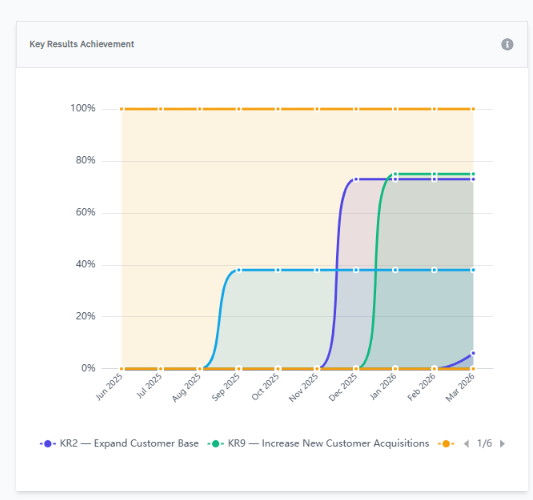
1️⃣ Key Results (KR) Achievement
This chart shows the progress of all project-related Key Results, including:
-
KR performance (% toward target)
-
Time remaining (urgency indicator)
It provides early insight into execution velocity, constraints, and prioritization issues.
Use this view to:
-
Compare progress speed between KRs serving the same objective
-
Identify stagnant KRs that need support
-
Detect rapid progression (“steep slope” improvements)
-
Validate alignment with strategic ambition and delivery timelines
Early warnings signal :
-
Long periods without progress → execution or reporting issues
-
Last-minute spikes → compressed work or late updates
-
Wide variability → uneven prioritization or bottlenecks
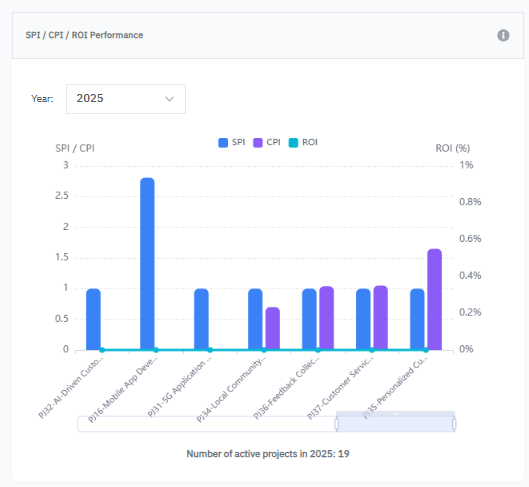
2️⃣ SPI / CPI / ROI Performance
This chart consolidates three essential execution indicators:
-
SPI (Schedule Performance Index) – Are projects delivered on time?
-
CPI (Cost Performance Index) – Are projects delivered on budget?
-
ROI (Return on Investment) – Are projects delivering expected value?
It provides a holistic view of execution efficiency, financial discipline, and value realization.
Use this view to:
-
Ensure on-time, on-budget delivery
-
Assess return on strategic investments
-
Detect deviations early
Key interpretation patterns:
| Pattern | Meaning |
|---|---|
| High SPI + Low CPI | Fast but expensive execution |
| Low SPI + High CPI | Slow but cost-efficient (risk of delay) |
| Low ROI with good SPI/CPI | Poor value realization |
his analysis supports:
-
Budget and capacity reallocation
-
Acceleration of high-impact initiatives
-
Corrective actions and risk mitigation
-
Strategic reprioritization
3️⃣Projects Requiring Attention
This section highlights projects that are delayed or at risk of missing deadlines.
A project appears here when:
-
Its performance score is ≤ 0.5, and
-
It has less than 30 days remaining
These initiatives typically require immediate managerial or strategic intervention.
Use this view to:
-
Detect early warning signals
-
Trigger corrective actions or escalation
-
Review blockers, dependencies, or resource gaps
-
Avoid delivery slippage impacting strategic goals
4️⃣Top High-Performing Projects
This widget highlights projects that are ahead of target.
A project appears in this category when:
-
Its performance score is ≥ 0.8, and
-
It has at least 30 days remaining before the planned deadline
These projects typically demonstrate:
-
Strong execution discipline
-
Predictable progress
-
Low operational risk
Use this view to:
-
Identify projects delivering strong value
-
Highlight best practices across teams
-
Accelerate or expand high-performing initiatives
-
Optimize resource allocation and capacity
✅ Summary
The Project Performance view of the Strategy Dashboard is the execution command center for strategic leaders.
It provides a single source of truth for:
-
Delivery health
-
Execution risks
-
Financial efficiency
-
Strategic alignment
By combining visibility across Financial, Risk, Strategy, and Project Performance, AIZOPlan enables leaders to:
-
✔ Maintain immediate awareness of what is on track
-
✔ Detect risks and bottlenecks early
-
✔ Make confident, data-driven decisions
-
✔ Maximize value realization across the entire portfolio
With AIZOPlan, strategy is not only defined—it is executed with discipline, visibility, and impact.