
Overview
AIZOPlan offers a suite of portfolio-level dashboards that provide real-time insights into how portfolios contribute to strategic goals. These dashboards support informed decision-making by offering a clear view of execution status, funding distribution, and overall portfolio health.
📌Step1- Access Portfolio Dashboards
-
Navigate to the main menu:
Portfolio > Track > Portfolio Dashboard
🔍Step2. Understand Portfolio Dashboard
- Choose from the following dashboards, each offering a specific perspective:
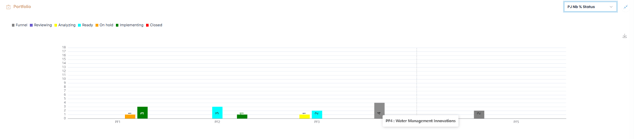
PJ Nb % Status
Displays the number of projects within each portfolio, grouped by current project status.
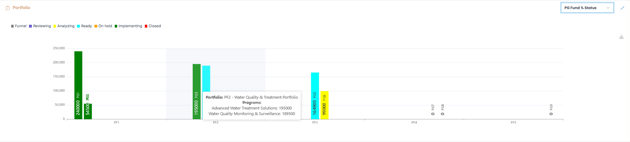
PG Fund % Status
Shows the distribution of allocated program funds by current program status within each portfolio
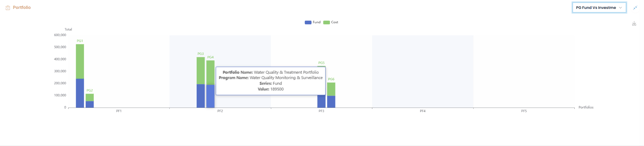
PG Fund vs. Investment
Compares the allocated fund against forecasted program costs, helping track budget alignment for each program in the portfolio.
Health Status
Provides a snapshot of the selected portfolio's health based on ROAM risk categories (Resolved, Owned, Accepted).

Impact vs. Complexity % Strategy Goal
Maps the impact and complexity of programs or projects, showing how they contribute to strategic goals.
📌Step3-Export Dashboards
Some Portfolio dashboards can be exported for use in Strategic reviews, Executive reports, Stakeholder presentations
Simply click  to save as image .
✅Summary
Portfolio dashboards in AIZOPlan provide five powerful, data-driven view of how portfolios contribute to strategic objectives.