
Overview
The Portfolio Studio in AIZOPlan offers three powerful methods to build your transformation roadmap, helping you define and structure strategic portfolios with clarity and intent.
You can choose to:
-
Launch a Digital Maturity Assessment (DMA)
-
Use the Lean Portfolio Management Stepper
-
Take full control with Direct Portfolio Design
Once a portfolio is created using any of these approaches, it is automatically added to the Portfolio Backlog for tracking and ongoing management.
📌Access the Portfolio Studio
You can open the Portfolio Studio in two ways:
- Option 1: From the main navigation, go to
Portfolio → Develop → Portfolio Studio - Option 2 : Open the Portfolio Studio directly from the Portfolio Office.
📌Create your transformation roadmap
Build your transformation roadmap by identifying opportunities, addressing maturity gaps, and shaping innovation streams. AIZOPlan provides three guided approaches:
🔹 Digital Maturity Assessment (DMA)
Structure your roadmap based on organizational maturity insights.
👉 Build Your Roadmap with the Digital & AI Maturity Assessment Stepper
🔹 Lean Portfolio Management Stepper
Generate a strategic roadmap using an agile-aligned planning flow.
👉 Generate a Strategic Roadmap with the Lean Portfolio Management Stepper
🔹 Direct Portfolio Design
Take full control and manually define your portfolio structure and roadmap.
👉 How to Create a Strategic Roadmap with Direct Portfolio Design
📌Explore the Porfolio Backlog
From the Portfolio Office, you can open the Portfolio Backlog.
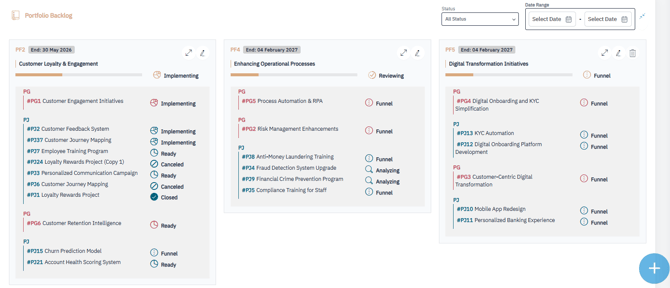
The portfolio backlog is a central repository for managing and prioritizing high-level initiatives that align with an organization's strategic goals. It serves as a dynamic tool for visualizing, prioritizing, and orchestrating the organization's portfolio of strategic initiatives or solutions. This tool helps with loading and organizing portfolios, updating portfolios, managing orphan initiatives, and leveraging Canvas SAFe, a comprehensive framework for managing Agile portfolios and implementing SAFe methodologies
You can filter the backlog by:
-
Status
-
Date Range
✅ Summary
With Portfolio Studio, you have the flexibility to build transformation roadmaps using guided steppers or direct design, putting strategy at the core of your planning process.
The Portfolio Backlog provides a centralized view to manage and update your portfolios — ensuring strategic alignment and execution readiness.