
Overview
In AIZOPlan, budget sources are managed at the portfolio level through the Investment Planning module. Each budget source represents a funding stream allocated to a specific portfolio. These sources can be classified by type, category, and funding purpose, allowing teams to plan and track investments with greater clarity and accountability.
Use this article to access, add, and manage budget sources for your portfolios.
📌Accessing the Budget Sources Section
-
Go to Portfolio → Plan → Investment Planning Studio or Open the Investment Planning Studio directly from the Portfolio Office.
-
Click on the Budget Sources tab.
- A list of existing budget sources will be displayed.
- Use the column selector
 to show or hide columns like Source Type, Category, and Funding Type.
 - Use the search bar to quickly find specific sources.
➕Adding a New Budget Source
-
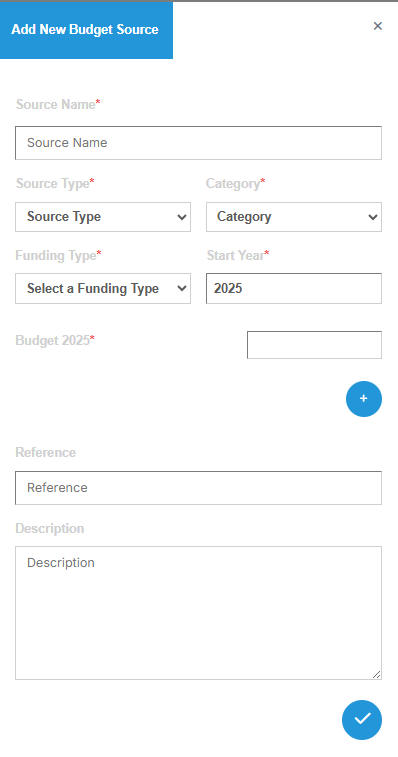
Click the “Add Budget Source” button to open the Add New Budget Source dialog box.
-
Fill out the required fields as follows:
-
-
Source Name*
Enter a clear, descriptive name for the funding source (e.g., Strategic Innovation Fund, Tech Modernization Grant, Operational Budget). -
Source Type*: Indicate the origin of the funds. Choose from:
-
Central
-
BU (Business Unit)
-
Tribes
-
CxO
-
-
Category*: Specify the financial classification:
-
OPEX (Operational Expenditure)
-
CAPEX (Capital Expenditure)
-
-
Funding Type*: Define the funding intent:
-
Strategic
-
Operational
-
Tactical
-
Special
-
-
Start Year*: Enter the first year the funding becomes available (e.g., 2025).
-
Budget [Year]*: Provide the budget amount for the corresponding year (e.g., $2,000,000 for 2025).
Click the to add budgets for additional years (e.g., 2026, 2027).
🔹Additional Fields-
Reference (optional)
Link to a financial plan, funding agreement, or internal documentation. -
Description (optional)
Add notes, constraints, or specific usage details (e.g., "To be used exclusively for AI-related initiatives in retail and SME segments.").
-
✏️ Managing Existing Budget Sources
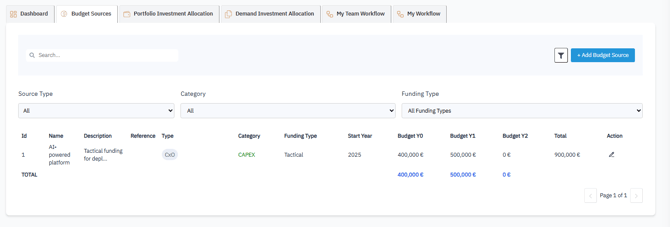
- To edit an existing source, locate it in the list and click the Edit icon

✅Summary
The Budget Sources section centralizes your organization’s funding inputs, enabling you to define their origin, purpose, and yearly allocations at the portfolio level. This helps ensure transparent, traceable, and strategic investment planning.
👉 For next steps, see the article:
How to Allocate, Adjust, and Transfer Budget at the Portfolio Level