
Overview
In the AIZOPlan demand management process, each new request progresses through structured lifecycle stages :
Funnel → Review → Analysis → Prioritization → Planned
Once a demand reaches the Analysis stage, it must be evaluated using a weighted scoring model. This ensures prioritization based on objective criteria such as strategic alignment, feasibility, value, and urgency.
This article explains how to complete the scoring process for a demand, understand each scoring dimension, and interpret the resulting score using the Edit Demand – Scoring interface.
🔢Step1. Accessing the Scoring Panel
- To Open the Demand Management Studio from the main navigation
Portfolio → Plan → Demand Management Studioor directly from the Portfolio Office.
-
Click the Demand Hub tab to access the central workspace for managing demands.
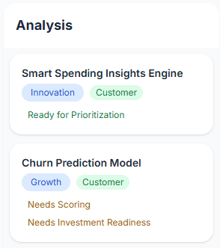
- Locate the demand at the Analysis stage in the KanBan View.
-
The demand will display a "Need Scoring" tag
-
(Example: the Tag is displayed for the “Churn Prediction Model” demand)
-
-
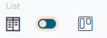
Select List View
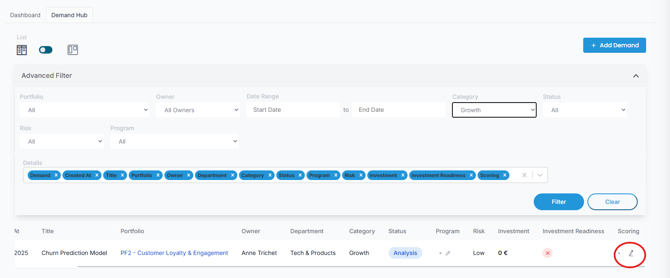
- Locate the demand at the Analysis stage and edit

-
Click the Scoring icon and assess the scoring.
🔢Step2. Understanding Scoring Criteria
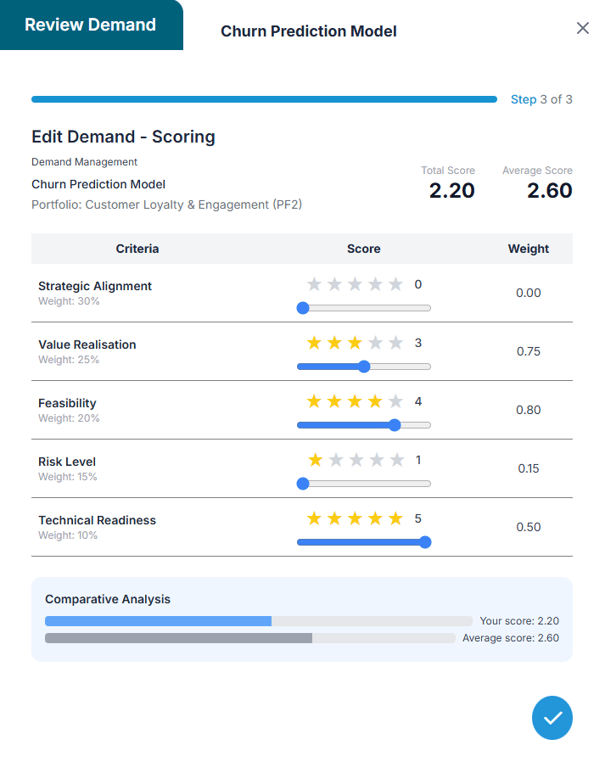
Each demand is scored across five weighted criteria. Ratings are assigned using a 5-star scale (0–5), where each star value is multiplied by the associated weight.
| Criteria | Description | Weight |
|---|---|---|
| Strategic Alignment | How closely the demand aligns with strategic objectives | 30% |
| Value Realization | Expected impact on business outcomes (ROI, savings, revenue, etc.) | 25% |
| Feasibility | Likelihood of successful execution given current capabilities and constraints | 20% |
| Risk Level | Level of uncertainty or exposure (lower score = higher risk) | 15% |
| Technical Readiness | Maturity of the solution or technology involved | 10% |
🔢Step3. Assessing Scores
-
In the Edit Demand—Scoring form, click on the star rating for each criterion to adjust the score if needed.
-
The total score is automatically calculated based on the defined weights
- Click Save
 to apply and confirm your scoring.
Once scoring is complete:
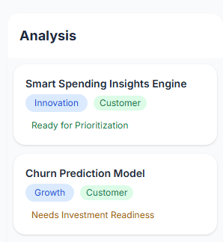
- The “Need Scoring” tag will be automatically removed in Kanban View
- (Example: the tag will disappear from the “Churn Prediction Model” demand after saving.)
✅ Summary
Scoring is a key step in evaluating a demand’s strategic value and execution potential. By completing the scoring process, you provide essential input for objective, portfolio-level prioritization.
Once a demand is scored and its investment readiness assessment is finalized, it is marked as ready for Prioritization and can proceed in the decision-making process.
🔹 Next Step: Prioritizing and Approving Demands
🔹 Need to finalize investment readiness? See: Evaluating Investment Readiness with the ROI Simulator