
Overview
In the AIZOPlan demand management process, each new request progresses through structured lifecycle stages :
Funnel → Review → Analysis → Prioritization → Planned
Once a demand moves from Funnel to Review, it must be assessed for completeness, value, and feasibility before advancing to Analysis and later Prioritization.
This article walks you through the process of reviewing a demand at the Review stage—including how to access it and complete the required evaluation fields in the Demand Hub.
🔢Step1. Accessing the Demand Hub
- Open the Demand Management Studio from the main navigation
Portfolio → Plan → Demand Management Studioor directly from the Portfolio Office.
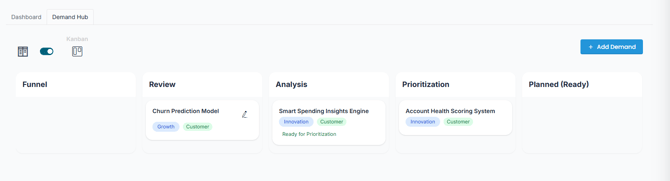
- Click the Demand Hub tab to enter the central workspace.
-
Locate the demand currently in the Review stage.
-
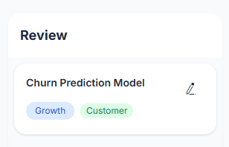
Click Edit
 to open the Edit Demand form and begin the review.
🔢Step2. Reviewing the Demand
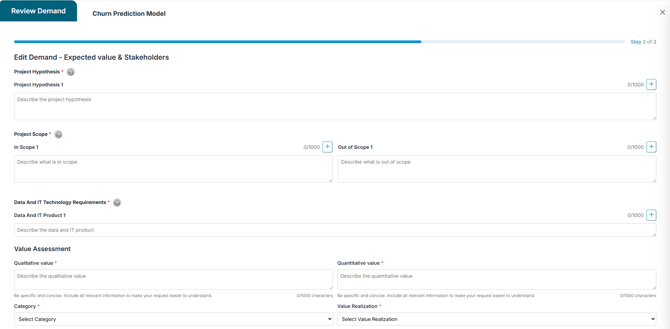
The Edit Demand form is designed to capture key information used to assess the demand's Scope, value, feasibility, risk, and ownership .
🔹 Project Definition
-
Project Hypothesis: Describe the core problem or opportunity the demand addresses.
-
In Scope: Specify the work or deliverables included in the demand.
-
Out of Scope: Clarify any exclusions or non-covered areas.
-
Data & IT Requirements: List data sources, systems, or integrations required.
Tip: Activate AIZO assistant if needed to support data gathering or validation.
🔹 Value Assessment
-
Qualitative Value: Highlight strategic benefits, user impact, or competitive differentiation.
-
Quantitative Value: Estimate financial returns, cost savings, or revenue potential.
-
Category: Select a value classification :
-
Identify Waste
-
Missed Opportunities
-
Legal/Standard Requirements
-
Pain Points
-
Unmet Needs
-
Best Practices
-
-
Value Realization: Indicate how and when the value will be captured. Choose a pattern :
- Flat (35/70/100),
- Ramp Up (60/90/100),
- Maximum (100/100/100),
- Early (80/90/100),
- Late (10/20/100),
- Mid (15/85/100)
🔹 Project Assessment
-
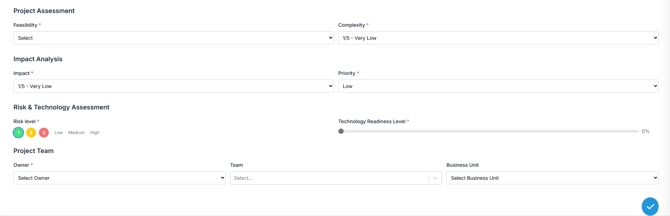
Feasibility: Assess the practicality of implementation given current capabilities (Very High to Very Low).
-
Complexity: Evaluate the effort, dependencies, or uncertainty involved (Very Low to Very High).
🔹 Impact Analysis
-
Impact: Estimate the operational or strategic effect of implementing the demand (Very Low to Very High).
-
Priority: Assign a priority level based on urgency and value (Low,Medium, High).
🔹 Risk & Technology Assessment
-
Risk Level: Assess the level of risk as Low, Medium, or High.
-
Technology Readiness Level (TRL): Rate the maturity of the proposed solution on a scale from 0 to 100.
🔹 Project Team
-
Owner: Assign the person accountable for the demand.
-
Team: List the involved team.
-
Business Unit: Specify the department responsible for delivery or sponsorship.
🔢Step3. Saving the Demand Assessment
Once the form is completed, Click  to finalize your review.
-
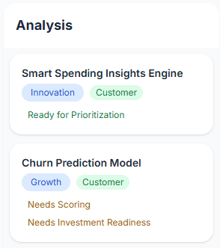
The demand will automatically advance to the Analysis stage, where it is tagged as "Need Scoring" and "Need Investment Readiness".
At this stage, you must complete the scoring and assess the investment readiness of the demand.
🔢Step4. Visualizing the Scoring
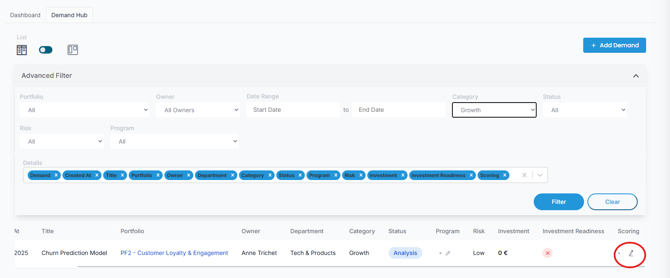
After saving, scoring information becomes visible in the List View:
-
Navigate to the Demand Hub → List View.
-
Locate your demand row.
-
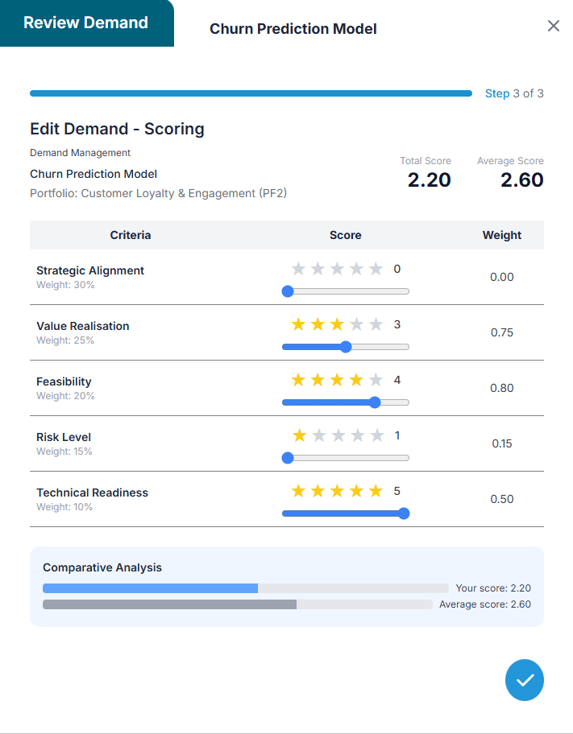
Click Scoring to view the calculated value based on your input.
✅ Summary
The Review stage in AIZOPlan is where each demand is assessed for scope, value, feasibility, risk, and ownership using the Edit Demand form. Once saved, the demand moves to the Analysis stage for scoring and investment readiness.
For guidance on how to complete scoring dimensions and use the scoring model, refer to the article:
👉 Performing Demand Analysis and Scoring