
Overview
Key Results (KRs) are measurable outcomes used to track the progress of your portfolio toward strategic objectives.
This guide walks you through how to create and configure Key Results within the Performance Management Studio. You 'll learn how to define actions, timelines and performance metrics with the support of AIZO, to ensure your portfolio's objectives are clear, measureable, and trackable.
📌Step1. Access the Performance Management Studio
To access the Performance Management Studio, use one of the following paths:
- Option 1: From the main menu, navigate to
Portfolio → Manage → Performance Management Studio - Option 2: Open Performance Management Studio directly from the Portfolio Office.
📌Step2.Adding Key Results
1. Open the “Add Key Result” dialog box
- In the Performance Management Studio, click
 to open the Key Result dialog box.
 - Select the relevant Portfolio where you want to assign the KR.
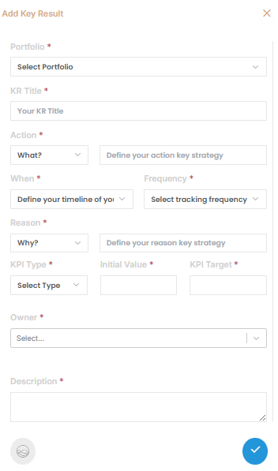
2. Fill in the Key Result Details
Complete the form with the following fields.
-
Title
Provide a clear and concise name for the Key Result.
Example : ease adoption of smart water meters with leak detection capabilities by 30% within the next 12 months
-
Description
Define what success looks like for this portfolio objective. -
Action
Choose a strategic action verb, such as:
Increase, Decrease, Improve, Optimize, Develop, Expand, innovate...
Then specify the performance area or metric.Example: increase: Number of smart water meter installations
-
When
Select the time horizon or timeframe for achieving the result. -
Frequency
Choose how often progress will be tracked (e.g., weekly, monthly, quarterly). -
Reason
Select the strategic reason for this KR (e.g., Growth, Efficiency, Market Share, Innovation, Customer Experience, profitability) and describe the rationale. -
KPI Type
Indicate whether the result is measured by Percentage or Absolute Value. -
Initial Value
Input the current baseline or starting point. -
Target Value
Set the quantifiable goal you aim to reach.
3. Save the Key Result
- Click
 to apply your Key Result to the portfolio.
4. Repeat as Needed
You can repeat the process to define multiple Key Results for the same portfolio.
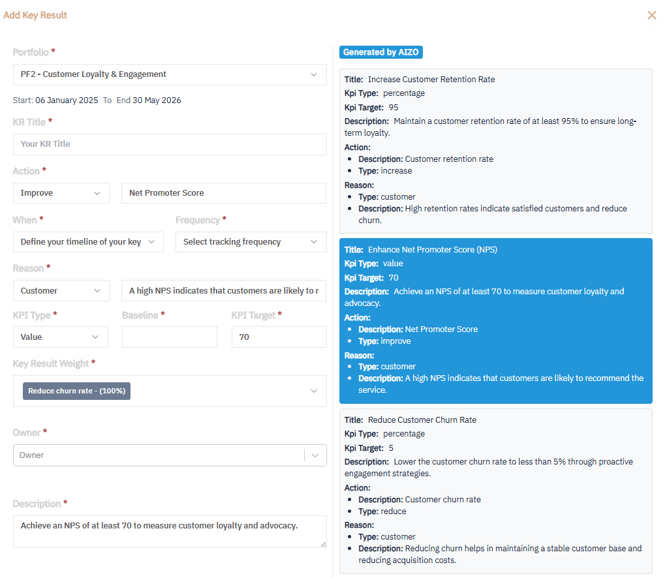
💡 Tip: Click AIZO  to receive AI-powered suggestions for Key Result actions, metrics, and targets—tailored to your portfolio’s strategy, industry trends, and organizational context. You can select and paste these recommendations directly into your Key Result form.
✅Summary
Setting clear and measurable Key Results (KRs) is essential to monitor your portfolio’s strategic performance.
With Performance Management Studio and support from AIZO, you can:
-
Define KRs aligned with strategic goals
-
Back them with real, trackable data
-
Monitor progress consistently over time
Next Step:
To learn how to track KR progress across your portfolio, read: How to Track Key Result (KR) Performance for a Portfolio Using the Performance Management Studio