
Overview
The Performance Management Studio enables you to track the progress of Key Results (KRs) across your portfolio. This tool helps portfolio managers monitor strategic execution in real time by capturing performance data, visualizing trends, and scoring progress on a 0 to 1 scale. By regularly updating KRs, you can ensure alignment with strategic goals, identify performance gaps, and make informed, data-driven decisions.
This article provides a step-by-step guide on how to access, review, and update performance data for Key Results within the Performance Management Studio.
📌Step1. Access the Performance Management Studio
To access the Performance Management Studio, use one of the following paths:
- Option 1: From the main menu, navigate to
Portfolio → Manage → Performance Management Studio - Option 2: Open the Performance Management Studio directly from the Portfolio Office.
📌Step2. Select the Portfolio
Choose the portfolio you want to monitor from the available list.
Note: If you have not yet set up your Key Results for the portfolio, see the related article:
How to Set a Key Result (KR) on a Portfolio Using the Performance Management Studio.
📌Step3. Select the Key Result (KR) to Track
Browse or search for the Key Result (KR) you want to review.
-
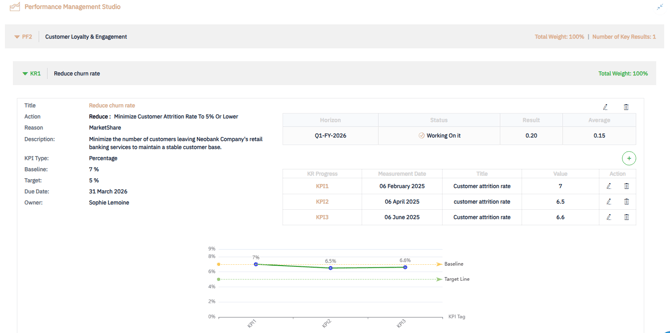
Upon selection, the following summary information will be displayed:
- Title : The name of the Key Result
- Action : Associated action
- Reason : Justification
- Description : Detailed explanation of the KR
- Initial Value : Starting point or baseline
- Due Date : Target completion date
- Owner : Person accountable for the Key Result
📈Step4. Track KR Progress
Each Key Result includes the following indicators:
-
Horizon – The strategic horizon associated with the KR
-
Result – The actual performance score achieved scaled from 0 to 1

- Status – Automatically calculated based on the Result value:
- Stuck
 : Result = 0 (No progress)
 - Working On it
 : Result between O.1 and 0.99
- Stuck
-
- Done : Result = 1 (Achieved)
-
Graphical View – A visual chart showing the evolution of the KPI values over time, helping you quickly assess trends and momentum.
📌Step5. Add a New KPI Entry
To update a KR with a new performance value (KPI):
-
Click
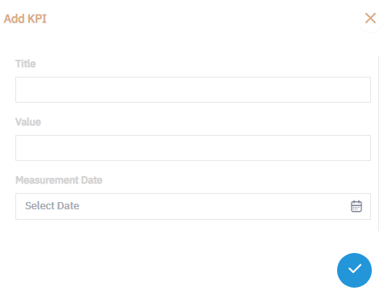
 to open the “Add KPI” dialog box.
 -
Enter the latest KR value :
-
Save the entry to update the performance trend
✅ Summary
The Performance Management Studio gives portfolio managers a powerful way to track, update, and visualize the progress of Key Results in real time.
By regularly reviewing performance data, analyzing trends, and updating KPIs, you can ensure alignment with strategic objectives, quickly identify gaps, and make smarter, data-driven decisions to drive portfolio success.