
Overview
Strategy Studio in AIZOPlan is a comprehensive workspace for strategic planning.
It enables your organization to define its vision, mission, core values, and long-term strategic goals, and to translate them into trackable outcomes using a chosen strategy framework.
📌Access the Strategy Studio
You can open the Strategy Studio in two ways:
-
Option 1: From the main navigation, go to
Strategy → Develop → Strategy Studio -
Option 2: From the Strategy Office landing page, open the strategy Studio directly.
📌Choose Your Strategy Framework
The framework can be selected within the organization settings.
AIZOPlan supports two options:
🔹iTransform365 (Default) – An OKR-based model
-
Define Vision, Mission, Pillars, and Core Values
-
Set high-level Strategic Goals
-
Break down goals into Objectives and Key Results (OKRs) for alignment and measurable progress
🔹Balanced Scorecard (BSC) – A performance-based framework
-
Define Vision, Mission, Strategic Themes, and Core Values
-
Organize Strategic Goals by four perspectives:
Financial, Customer, Internal Processes, Learning & Growth -
Translate goals into OKRs to drive execution
📌 Choose Your Strategy Input Method
1. Direct Strategy Input
Ideal for organizations with a pre-defined strategy that needs to be entered or updated in AIZOPlan.
👉 Use these guides:
-
How to Define and Update Strategy Attributes using iTransform365 (Direct Approach)
-
How to Define and Update Strategic Goals and Key Results using iTransform365 (Direct Approach)
- How to input and Update Strategy Attributes Using the Balanced Scorecard (Direct Approach)
- How to input and update strategy Goals and Key Results Using the Balanced Scorecard (Direct Approach) ?
2. Wizard Stepper
A guided process that walks you through each step of strategy definition.
👉 Wizard Stepper Guides:
- How to Create Your Strategy Using the iTransform365 Wizard Stepper ?
- How to Create Your Strategy Using the Balanced Scorecard (BSC) Wizard Stepper ?
📌Visualize Your Strategy
Once validated, your strategy becomes available in a dedicated visual view (iTransform365 view or Balanced Scorecard View) based on the selected framework. Click the icon  to show the visual View.
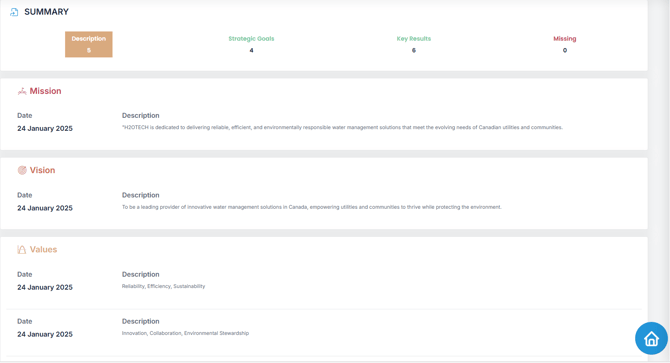
📊iTransform365 View
A structured summary that includes:
-
Strategy Attributes (Vision, Mission, Values)
-
All Strategic Goals
-
Associated Key Results
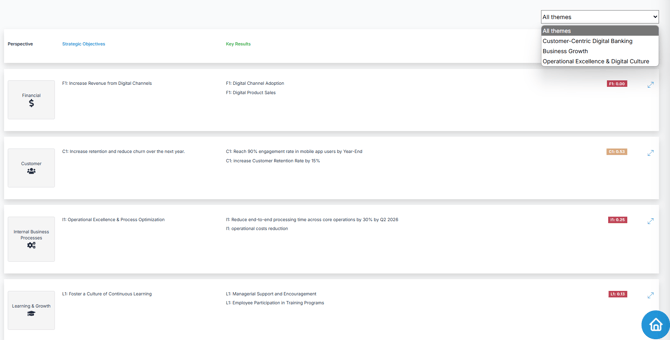
📊Balanced Scorecard View
Displays:
-
Strategic Goals organized by Perspective and grouped under Strategic Themes
-
Key Results aligned with each goal.
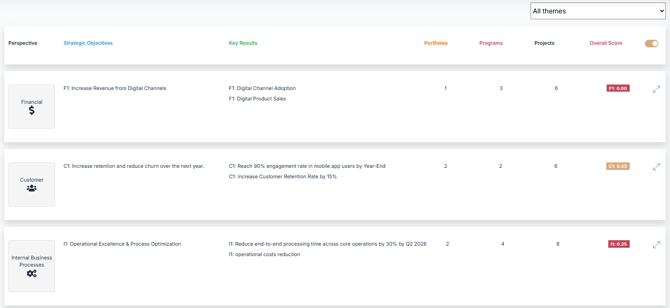
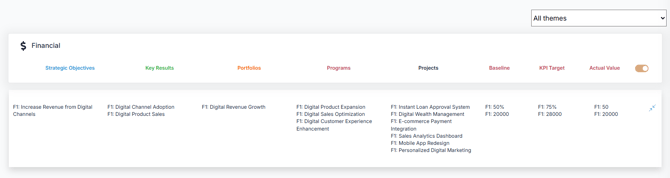
Extended Balanced Scorecard View (Optional)
During strategy execution, you can switch to the Extended BSC View to explore deeper connections between strategy and execution.
This enhanced view includes:
-
Strategic Goals and Key Results
-
Linked Portfolios showing how investments support strategy
-
Associated Programs and Projects aligned with strategic objectives
-
Expandable Perspectives for deeper analysis
✅ Summary
Strategy Studio in AIZOPlan provides everything you need to define, structure, and monitor your organization’s strategy — whether using an OKR-driven or performance-based approach.
Choose your framework, define your goals, input data manually or with guidance, and visualize how strategy links to execution.