
Overview
iTransform365 is AIZOPlan’s standard strategic framework. It is an OKR-based model focused on defining Mission, Vision, Pillar, Core Values, Strategic Objectives, and measurable Key Results and helps organizations translate their vision and strategy into clear, actionable objectives, driving alignment, agility, and transformation across all levels.
With iTransform365, a strong organizational direction begins with a clearly defined Mission, an inspiring Vision, a set of Pillar and a set of strong Core Values. These elements shape your corporate identity and act as a strategic compass for all initiatives and decision-making.
This article explains how to define, view and update your company's strategic attributes ( Mission, Vision, Values, Pillars) using the Direct Approach in the Strategy Studio.
The Direct Mode is ideal when your strategy is already defined, and you simply need to input or update your company's strategic attributes, goals, and key results without step-by-step guidance.
If you prefer a guided, step-by-step process, you can use the iTransform365 Wizard Stepper.
💡 Tip: You can activate AIZO at any time to receive AI-generated suggestions for a company's strategic attributes tailored to your industry and Strategic context
📌Step 1: Access the Direct Approach
-
Open the Strategy Studio in your Strategy Office.
-
Click "Direct Strategy" option, then click
 to continue.
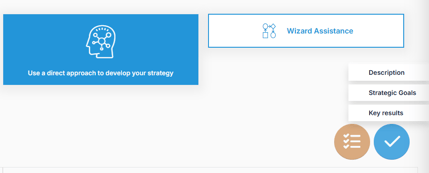
- Click "Description"

- Click "Start Your Strategy"
📝Step 2: Define Your Mission Statement
- Click
 to open the "Add your company's Description" dialog box
 - From the dropdown, select Mission.
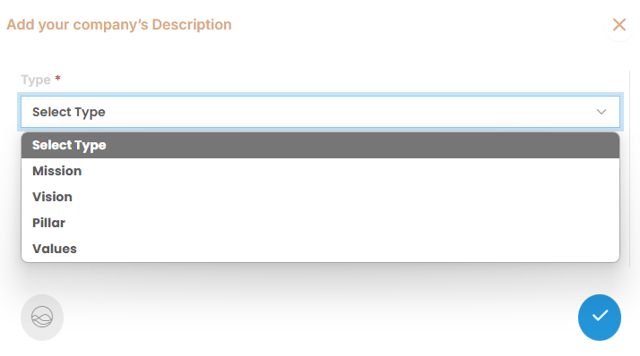
- Write a clear and concise Mission Statement that defines your company’s core purpose and reason for existing. The more specific and detailed your description, the better AIZO
 can support future tasks and refinements.
- Click
 to save your mission statement.
🌟Step 3: Define Your Vision Statement
- Click to open the "Add your company's Description" dialog box
-
Select Vision from the dropdown list.
-
Write a clear and aspirational Vision Statement that describes your company’s desired future state and long-term goals.
- Click
 to save your Vision statement.
🌟Step 4: Define Your Pillar Statement
- Click to open the "Add your company's Description" dialog box
-
Select Pillar from the dropdown list.
-
Write a clear and aspirational Pillar Statement that typically refers to a fundamental area or domain that supports and drives the overall digital transformation strategy. These pillars act as strategic focus areas that ensure comprehensive transformation across the organization. Each pillar encompasses specific objectives, initiatives, and metrics that align with the broader transformation goals.
- Click to save your Pillar statement.
- Repeat the process to add more Pillar.
💼Step 5: Define Your Core Values
- Click once more to open another dialog box.
-
Select Values from the list.
-
Enter a clear description of a Core Value that guides your company’s behaviors and decisions
- Click
 to save your Value statement.
 - Repeat the process to add up to 10 Core Values that define your organization's culture.
🔎 How to view a company's strategy attributes
The Strategy Pyramid offers a visual representation of your company's strategic hierarchy—from the most abstract (Mission, Vision, Values) to the most operational (Portfolios, Programs).
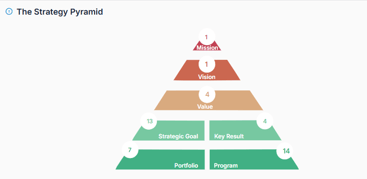
Within the Strategy Studio :
- Click Mission to view the mission statement.
- Click Vision to view the vision statement.
- Click Values to view the vision statement.
✏️How to update a company's strategic attributes :
1- Access the Direct Approach
- In your Strategy Office, open the Strategy Studio.
- Select the "Direct Stategy" option and then click to continue.
- Click "Description"

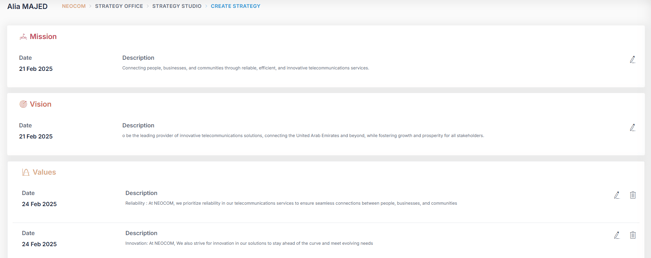
- Click "Start Your Strategy" to vizualise all Strategy attributes
2- Edit the Strategy Attributes
-
Edit
 any of the existing Mission, Vision, Pillar or Value statements as needed.
 - Click to save your changes.
✅Summary :
Defining and maintaining clear strategic attributes ensures that your organization stays aligned around a shared identity and purpose. Regular updates through the Strategy Studio help your team stay connected to the mission, vision, and values that drive your success.
To learn how to define and manage Strategic Goals and Key Results, refer to the article:
👉 How to Input and Update Strategy Goals and Key Results Using the iTransform365 Framework (Direct Approach)