
Overview
Demand Management in AIZOPlan helps your organization capture, assess, prioritize, and approve Demands that support Strategic Goals. A demand represents a new idea, business need, or opportunity that requires structured evaluation before becoming an executable project.
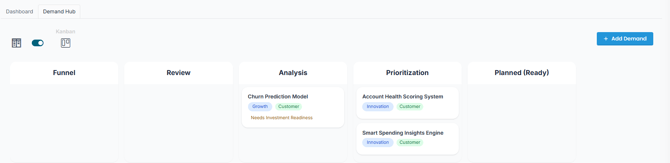
AIZOPlan provides the Demand Hub—a centralized workspace to manage all incoming Demands and guide them through the demand lifecycle:
Funnel → Review → Analysis → Prioritization → Planned
Accessing the Demand Hub
To open the Demand Hub:
-
Open the Demand Management Studio from the main navigation
Portfolio → Plan → Demand Management Studioor directly from the Portfolio Office. -
Then, select the Demand Hub tab to access the central workspace.
Demand Views and Tracking
The Demand Hub offers two views:
-
List View for tabular tracking and filtering
-
Kanban View for a visual, drag-and-drop interface that shows each demand’s position in the lifecycle.
The Kanban view makes it easy to monitor progress, from initial idea capture in the Funnel to final approval in the Planned stage.
This article provides a step-by-step overview of how to submit, evaluate, and progress a Demand through each stage—from idea intake to execution readiness.
🟢 Stage 1: Funnel – Submitting a New Demand
All demands begin in the Funnel stage.
How to Add a Demand
-
Navigate to Portfolio → Manage → Demand Management → Demand Hub
-
Click “+ Add Demand” and complete the submission form
Key Fields to Complete:
-
Title, Portfolio, Description
-
Business Need – Describe the problem or opportunity
-
Category – e.g., Innovation, Compliance, Cost Optimization
-
Impact Area – e.g., Customer, Operations, Revenue
-
Demanded Investment – Estimated budget required
-
Strategic Objectives - link to a Strategy Objective
Click Submit to send the demand to the Funnel stage.
👉 Full guide: How to Create and Submit a New Demand ?
🔍 Stage 2: Review – Assessing Feasibility and Value
In the Review stage, each demand is evaluated for completeness, feasibility, and alignment with organizational goals.
How to Review a Demand
-
In the Demand Hub, locate the demand in the Review stage
-
Click Edit to open the Edit Demand form and complete:
-
-
Project Definition – Scope, Out of Scope, Data/IT requirements
-
Value Assessment – Strategic and financial impact
-
Project Assessment – Feasibility and complexity
-
Impact & Risk – Operational impact, risk level, technology readiness
-
Ownership – Assign owner, business unit, and delivery team
-
Click Save to be able to move the demand to the Analysis stage.
👉 Full guide: How to Review a Demand ?
🧮 Stage 3: Analysis – Scoring and ROI Assessment
In the Analysis stage, demands are evaluated using a weighted Scoring model and an Investment Readiness Assessment (via the ROI Simulator).
Scoring the Demand
-
Navigate to the List View
-
Locate the demand in the Analysis stage (tagged with “Need Scoring”)
-
Click the Scoring icon to display the 5 scoring criteria
-
-
Strategic Alignment
-
Value Realization
-
Feasibility
-
-
-
Risk Level
-
Technical Readiness
-
Adjust the 5-star ratings and click Save.
👉 Full guide: How to Perform Demand Analysis and Scoring
Evaluating Investment Readiness with ROI Simulator
-
Go to Investment Planning → Demand Investment Allocation
-
Click “Resolve ROI” next to the demand and complete de ROI Simulator steps :
-
-
Step 1: Confirm the demand
-
Step 2: Add CapEx, OpEx, and Expected Earnings
-
Step 3: Refine entries
-
Step 4: Simulate ROI (confirm realization curve and visualize cash flow, EBITDA, and net value)
-
👉 Full guide: How to Evaluate Investment Readiness for a Demand Using the ROI Simulator
Once Scoring and Investment readiness are completed, the demand is marked as Ready for Prioritization and and can be advanced to the Prioritization stage.
📌 Stage 4: Prioritization—Ranking Demands for Approval
Demands that pass Scoring and ROI Simulation can be advanced to the Prioritization stage. Here, you can compare and rank demands based on their total score, funding needs, and strategic impact.
Pre-check Before Moving the demand to Planned
Before changing the demand status, confirm the following fields are completed in the List View:
-
Program is linked
-
Risk is identified
-
Investment is confirmed
-
Investment Readiness is completed
-
Scoring is finalized
Move the demand to Planned in the Kanban View, and confirm Start Date and End Date (used for SPI/CPI tracking).
👉 Full guide: How Do You Transition a Demand from Prioritization to the Planned (Ready Project) Stage
🚀 Stage 5: Planned – Preparing for Execution
In the Planned stage, the demand is officially approved, converted into a Project, and added to the Project Backlog.
When a demand is marked as Planned:
-
The Investment Planning module reflects confirmed investment (via Demand Investment Allocation—Project View)
-
The demand is automatically turned into a Project
-
Execution planning can begin in the Project Office
👉 Full guide: How Do You Transition a Demand from Prioritization to the Planned (Ready Project) Stage
✅ Summary
AIZOPlan’s Demand Management process helps you transform high-level ideas into investment-ready projects through five structured stages:
| Stage | Purpose |
|---|---|
| Funnel | Submit and register new demand ideas |
| Review | Assess feasibility, value, and ownership |
| Analysis | Score and evaluate investment readiness |
| Prioritization | Rank based on score and approve for execution |
| Planned | Convert to project and prepare for implementation |
At each stage, you can consult AIZO, your virtual assistant, to guide you, provide recommendations.