
Overview: The Strategy Office Experience
The Strategy Office in AIZOPlan is a centralized workspace designed to support end-to-end strategic planning, execution, and tracking. It is built around core components, with AIZO, your AI assistant  , providing real-time support throughout the entire process:
-
📊 Strategy Analysis Tools
 Industry Blueprints
-
🎯 Strategy Studio
-
📅 Planning Studio
-
 OKR Management Studio
  Strategy Dashboard
📊 Strategy Analysis Tools
The Strategy Office provides a dedicated Strategy Analysis Tools module, allowing you to input and manage key strategic analyses such as SWOT, PESTEL, and Porter's Five Forces. These structured inputs serve as the foundation of your strategic planning process and are used by AIZO to generate insights, highlight risks and opportunities, and support alignment across portfolios and initiatives.
👉 Full guide: How to Input Strategic Analyses as SWOT, PESTEL or Porter's Five Forces
 Industry Blueprints
Industry Blueprints provide pre-configured strategic frameworks tailored to specific industries. Use them as a starting point to accelerate your strategic planning process with best practices, sample goals, and ready-to-adapt structures
👉 Full guide: How to use Industry BluePrints
🎯 Strategy Studio – Input, Build, or Update Your Strategy
The Strategy Studio allows you to define or update your organizational strategy using a supported framework.
Choose Your Strategy Framework
The framework can be selected within the organization settings:
-
iTransform365 (Default for AIZOPlan) – It is an OKR-based model
-
Define your Vision, Mission, Pillars, and Values
-
Formulate high-level Strategic Goals
-
Translate those goals into OKRs to ensure alignment and trackable progress
-
-
Balanced Scorecard (BSC) – A performance-based framework that organizes strategy around four key perspectives: Financial, Customer, Internal Processes, and Learning & Growth.
-
Define your Vision, Mission, Strategic Themes, and Core Values
-
Formulate Strategic Goals aligned with each Strategic Theme and mapped to the four perspectives
-
Translate these goals into Objectives and Key Results (OKRs) to ensure alignment and drive execution
-
Choose Your Strategy Input Method : Direct Approach or Wizard Stepper
1. Direct Approach – Ideal for organizations that have already defined their strategy and want to input or update it directly.
👉 Full guide for iTransform365 Framework :2. Wizard Stepper for guided assistance through each step of the strategy-building process.
👉 Full guide
Visualize Your Strategy
Use the Strategy Studio to view your entire strategic hierarchy—from Vision and Mission down to Portfolios. This ensures full alignment from top-level strategy to execution.
📅Planning Studio – Forecast your Strategic OKRs
The Planning Studio allows you to forecast and manage your strategic OKRs over time.
-
OKR Roadmap Visualization – A dynamic roadmap to display OKRs, dependencies, and sequencing
-
Monitor Progress – Track progress at the overall and individual Key Result levels using performance scoring
-
Adapt with Flexibility – Adjust OKRs across different time horizons using drag-and-drop functionality
👉 Full guide : How to Forecast your Strategic OKRs with Planning Studio
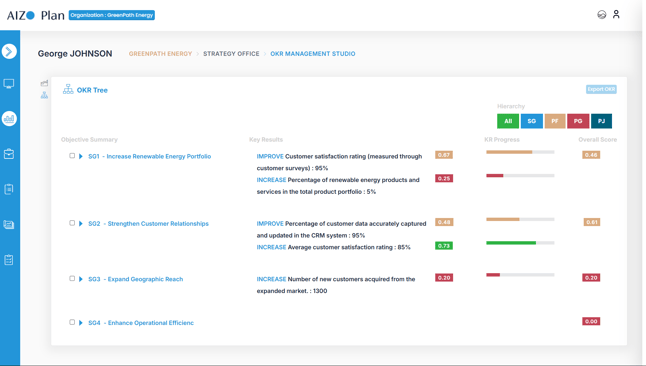
 OKR Management Studio - Track your OKRs
The OKR Management Studio enables effective check-ins and performance reviews to ensure your OKRs stay aligned and actionable.
-
Track Key Results – Analyze performance in both Summary and List views
-
Navigate the OKR Tree – Visualize how OKRs connect across Strategy, Portfolios, Programs, and Projects, enhancing transparency and alignment
👉 Full guide How to Track OKR Progress Using OKR Management Studio
 Strategy Dashboard
The Strategy Dashboard consolidates four complementary views, providing end-to-end visibility from strategic intent to execution :
-
Finance Performance Dashboard
provides real-time insights into budgets, investments, spending, and financial flows across Strategic Goals, portfolios, programs, and projects 👉 How to Use the Finance Performance Dashboard
-
Risk Performance Dashboard
provides a unified, end-to-end visibility of risk exposure across strategy, portfolios, programs, and projects to proactively protect strategic outcomes 👉How to Use the Risk Performance Dashboard
-
Strategy Performance Dashboard
provides a real-time assessment of how well the strategy is progressing across Themes, Strategic Objectives, and Key Results (KRs) 👉 How to Use the Strategy Performance Dashboard
-
Project Performance Dashboard
helps track execution health, detect risks early, and ensure that all initiatives contribute effectively to strategic goals 👉 How to Use the Project Performance Dashboard
Each view can be displayed:
-
Across all Strategic Goals for global execution visibility, or
-
Focused on one Strategic Goal for a targeted view on its initiatives and outcomes.
 AIZO – Your AI Strategy Assistant
AIZO is your intelligent AI assistant, built into the Strategy Office to guide and enhance your strategy experience. AIZO supports you at every stage—from initial planning to execution monitoring—by offering contextual, data-driven recommendations based on:
-
Your chosen strategy framework
-
Your inputs from SWOT, PESTEL, or Porter’s analyses
-
Selected industry blueprints
-
Strategic objectives, historical performance, and benchmarking data
AIZO Supports Your Strategic Foundation
- Recommends clear and aligned Vision, Mission, and Core Values
- Helps define Strategic Themes or Pillars that guide your strategy
- Assists in formulating impactful Goals linked to strategic direction
- Supports the creation of SMART Key Results to track measurable success
Ask AIZO for Help
You can ask AIZO questions at any point during planning or tracking, such as:
-
“Does this OKR align with our customer-centric theme?”
-
“What gaps do you see in our internal process goals?”
-
“Suggest a new key result for improving operational efficiency.”
-
“How does this project support our strategic objectives?”
💡 Think of AIZO as your strategy co-pilot—always available to enhance decision-making, accelerate planning, and ensure your strategy stays focused, relevant, and achievable.